Your email engagement starts with an open, but sometimes your open rate may leave you feeling a little deflated. Don't worry, though! We have some pointers to help you increase your opens that cover a broad span of topics, from the no-brainers to the technical:
Craft the right subject line
Your subject line does most of the heavy lifting for your email; if it's not attention-grabbing or has become repetitive, your contacts won't even get to your content! But when you know your audience and your content is targeted, it makes all the difference. Putting the perceived benefits front and center is a surefire way for your email to get the attention it deserves, and we have lots of tools to help you do this:
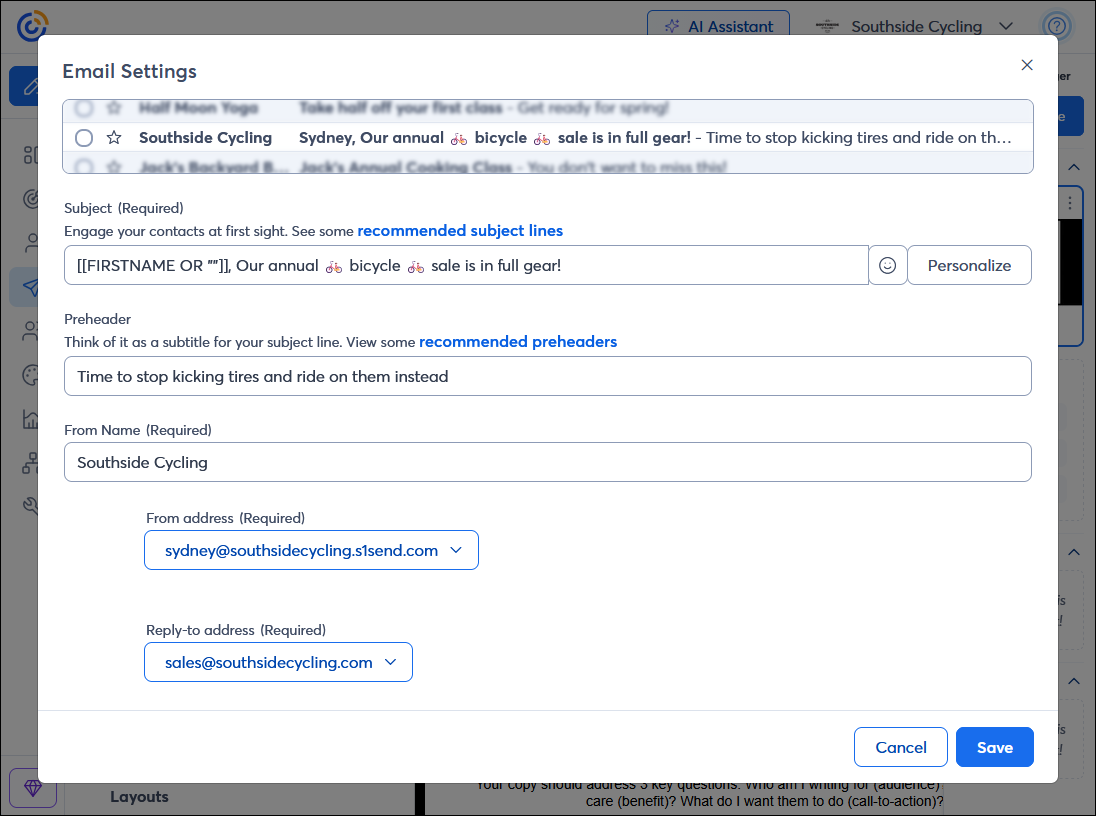
- Follow best practices - Not sure where to start? Industry best practices can help you write a descriptive subject line that's short and effective, and doesn't land you in the spam folder.
- Pair your subject line with a preheader - Most mail clients display the subject line and an additional line of text called the pre-header. It gives you a little more room to summarize your content so your contacts know what they can expect in your email.
- Add personalization - Your readers are bombarded with emails every day. Adding your contacts' names to the subject line is an easy way to grab attention and make your email feel more personal. You can also get a little creative with other contact details, too!
- Occasionally add emoji - Emoji are useful for setting the tone of your email and for adding a little pop of color that catches your contacts' eyes in their inboxes. When overused, emojis can seem unprofessional, but when used strategically, they're a great tool to have in your toolbelt.
- Get a recommendation - Sometimes it feels like your subject line writes itself, but other times it seems like nothing feels quite right. A little AI can help you when you're stuck, and you can use the recommendation as-is or use it as a jumping-off point. If you find yourself using the same subject line over and over, give this tool a try!
- A/B test when you're not sure - If you have lots of ideas, testing your subject line to see which one performs better is a smart strategy to maximize your opens. Two subject lines are sent to a portion of your audience, and the one that gets more opens is sent to everyone else.
 | Design tip: Segmenting your contacts can make it easier to write an effective subject line because you're not trying to write something that is one-size-fits-all. You can send your email multiple times with different subject lines, each tailored to a specific segment! |
Provide quality content
Your subject line was enough to get your contacts to open this time, but what about next time? If your content doesn't hold your contacts' interest, your subject line might not be enough to bring them back again. Your content should be relevant and informative and include a call-to-action so your contacts can further engage with you:
- Email Content Ideas by Industry - From trends, to important times of the year, to the tone you use in your email, your industry has an enormous impact on your email content! If your email doesn't make you look like an expert in your field, it can turn your readers off.
- Get to the point with a clear call-to-action - You got your contacts to open with your subject line, and now your call to action needs to be enticing, relevant, and most of all, easy to do. Emails with too many calls to action can leave the reader feeling overwhelmed and less likely to engage.
- Create more personalized emails to improve engagement - Even emails that need to include blanket content for a wide audience can benefit from something as simple as adding your contact's name in the greeting.
- Customize what each contact sees in your email with dynamic content - One email can become a powerhouse because you can create different variations without having to create multiple emails.
- Use the Content Generator to write email, landing page, social, and SMS content for you - Writer's block is real! When you know what you want to say but don't know how to say it, AI can be a great tool to use as a jumping-off point.
 | Did you know? Your open rate is only one part of your email engagement! Don't neglect your email's click rate, because it shows how engaged your contacts are with your content after they've engaged with your subject line. |
Give your non-openers a second chance
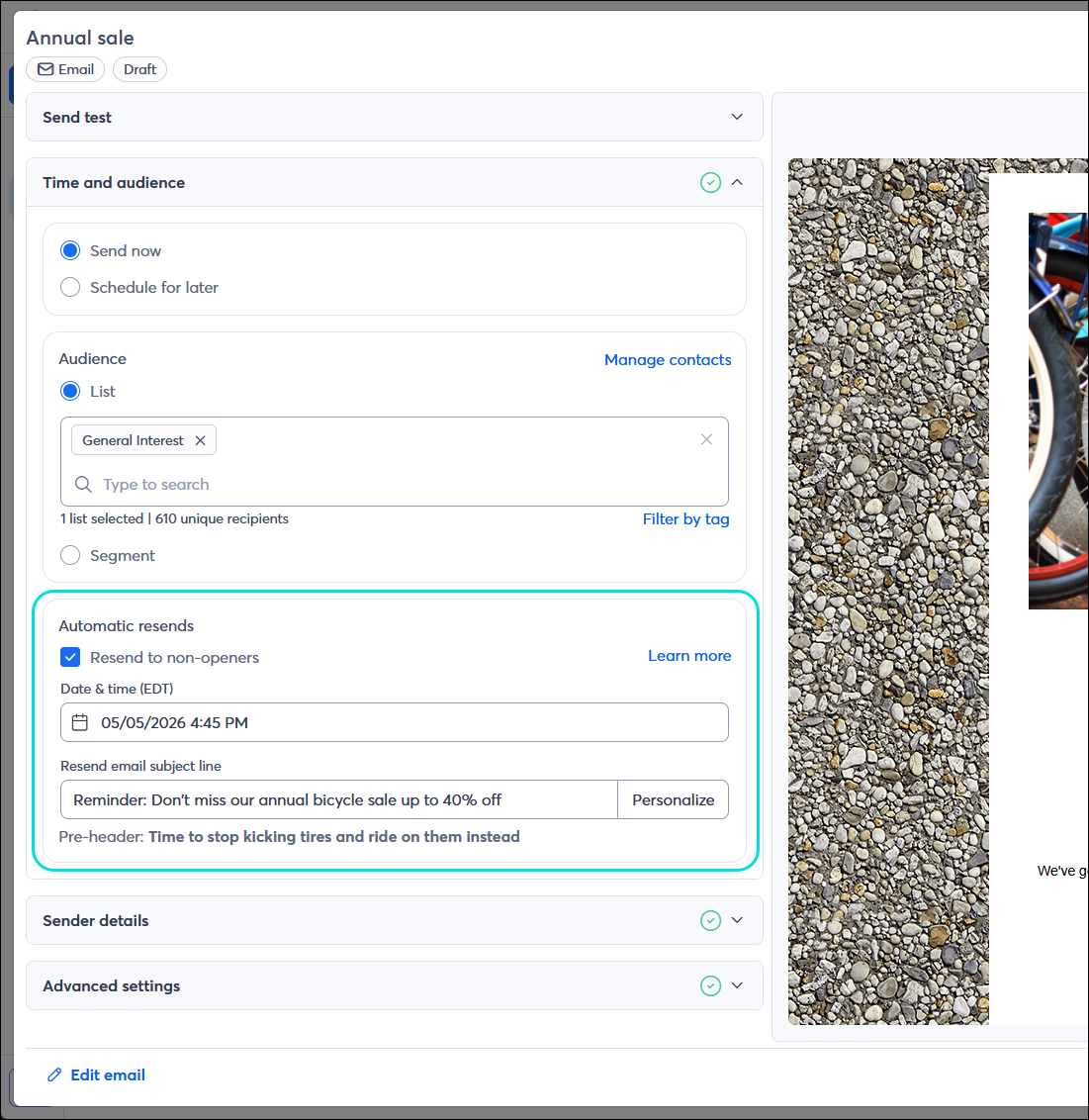
Have you ever skipped past an email in your own inbox? There are countless reasons your contacts may not open your email the first time. Give your contacts a second chance to see and open your email by scheduling it to automatically resend to non-openers. A second chance for your contacts means a second chance for you, too! Take the opportunity to change your subject line or select a different time of day to send your email. You can compare the performance of both your original send and your resend on the Email Details page to see which performed better, and then use this information the next time you're ready to hit "Send":
 | The data shows: A best practice is to send your email to non-openers once, but don't overuse a resend. It's better to look at the contacts who didn't open after two attempts and find a way to reconnect than to keep sending something they don't have any interest in (that's what spam is!). |
Check your reporting regularly to get a baseline
Before you can improve your open rate, you have to know where you stand. Checking your overall email reporting lets you see how each campaign has performed over time and compare your emails. You may see a steady rate email-to-email, but you can also see fluctuations caused by a number of factors, like the audience you sent to, the time of day you sent, and the subject line. The industry average gives you a goal to reach for, and it isn't often as high as you think to be effective:
 | Important: A "good" open rate varies by industry. Make sure you have an industry selected in your account settings so that you can see how your open rate compares to your industry's average within your email reporting. |
Check the time your contacts opened
While everyone might have an email address, each demographic checks their inbox at different times throughout the day; some people check their email right when they wake up in the morning, while others do it during lunch:
- Review your send times - Check your email reporting to see when each open occurred, and use it as a gauge for when to send. If you routinely send a newsletter email on a specific date or time, checking the open times can still help you find a sweet spot to use going forward.
- Check your time zone - When your email is sent, your reporting is based on the time zone you select in your account settings and is not adjusted to your contacts' time zones.
Segment your contacts
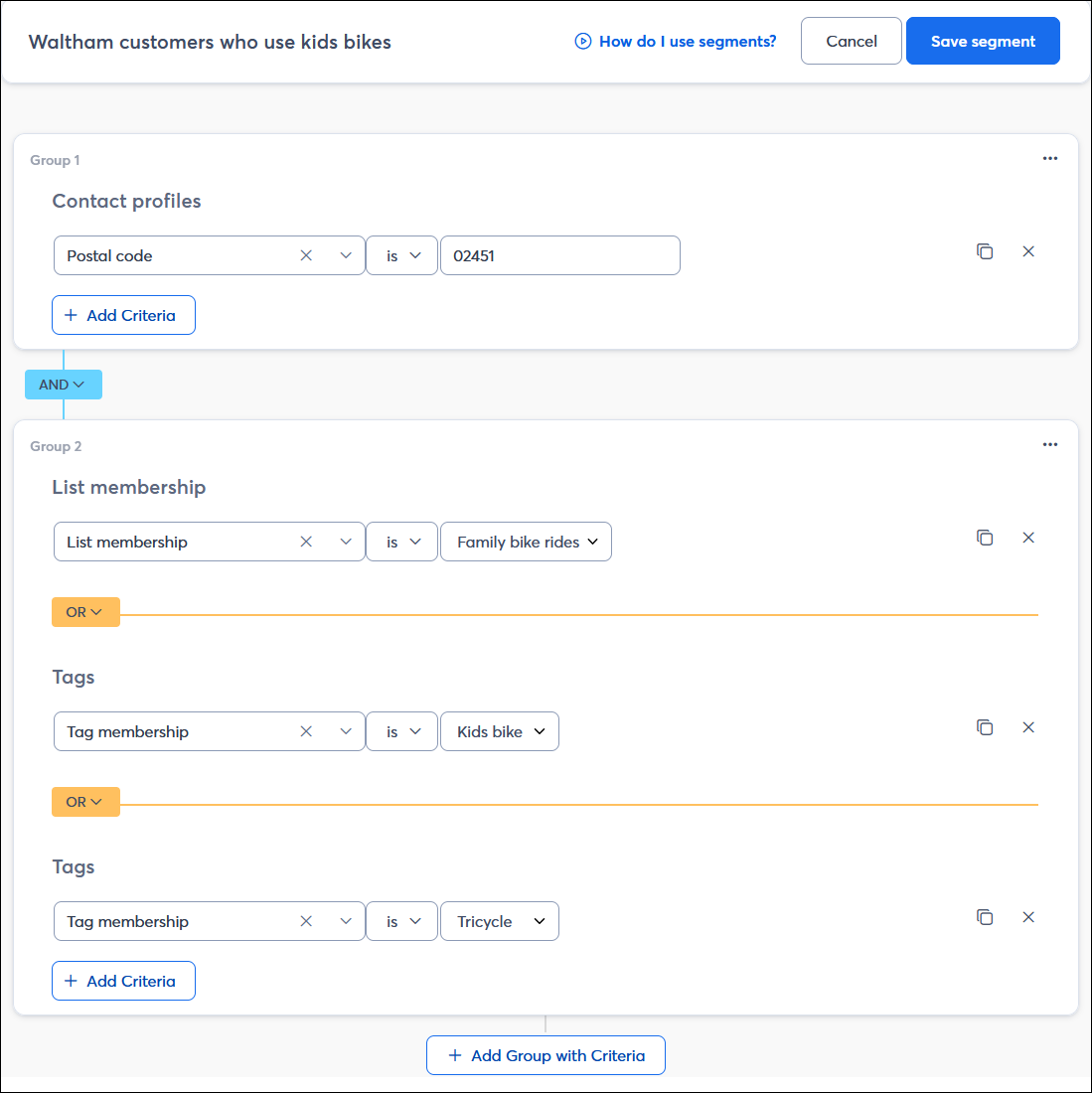
A little contact segmentation can have a huge impact on your open rate. When your email content doesn't connect with your intended audience, they'll get bored and start ignoring your emails. People are more likely to open and read an email when it's full of content relevant to them; our segmentation tools help you group your contacts based on their location, interests, shopping behavior, and more, so you can tailor your emails to each group’s preferences. You can approach segmentation in a couple of ways: create an email and choose the contacts you think are most likely to resonate with it, or choose a group of contacts and tailor your email content to them.
| The data shows: Shorter emails with personalized content have higher open rates than longer emails with generic content for everyone! |
Perform some list hygiene
Unresponsive contacts can become disengaged for many reasons, but ultimately bring down your open rate. Over time, you want to make sure you're performing some routine list maintenance to keep your contact list healthy and make sure you're able to engage with all of your contacts:
- Collect quality email addresses - Contacts who provide permission to email them are more likely to engage with your content because they expect you to send it to them. Contacts who are added to your list without their consent are highly likely to report your emails as spam and are a violation of our email permission policy.
- Look for contacts who aren't on any list - You may have contacts you haven't been emailing because, for one reason or another, they were removed from all of the lists in your account. You can find these contacts using the list status filter on the Contacts page. Once you find them, you can add them to a list and send them content they may have missed but might find valuable.
- Manage your bounces - Your email reporting shows you all the email addresses you sent to, but that didn't receive your email. Inactive email addresses aren't automatically removed for you, so every time you send, check your reporting and look for contacts recommended for removal. The number of bounces you have is factored into your open rate!
- Engage with your least engaged contacts - You worked hard to collect your contacts, and it's easier to reconnect when their engagement drops than to collect all new contacts. Using our Segment Builder, you can find your least-engaged contacts and send them targeted content to try to re-engage; this doesn't always have to involve offering a discount, either!
- Enable feedback from your unsubscribed contacts - Unsubscribes happen, but you can make the most of them by asking for a reason for the unsubscribe. When the feature is enabled, any time a contact unsubscribes, they're presented with multiple options, including an open-form text box, so you can collect more insights into your email marketing.
- Keep your Update Profile form current - Your contacts can click the "Update profile" link in any email footer to add or remove themselves from lists based on their interests and provide additional contact information. This is a great alternative to unsubscribing, giving your contacts more control over what they want to receive from you!
- Remove role addresses - Role addresses aren't received by a single contact and can increase the likelihood that your email goes unopened or is marked as spam because not everyone who receives it supplies their consent. Taking a few minutes to check your contacts for role addresses is worth the effort for a cleaner list full of contacts who want to be there.
| Did you know? Your email marketing efforts are just a part of your marketing toolbelt, and Constant Contact offers both social media marketing and SMS marketing tools to help you meet your customers where they're at! If your open rate isn't budging, ask your contacts if they'd prefer to hear from you via SMS or try enticing your social media followers to join your list. |
Strengthen your reputation
Your sending reputation is everything! If you're using Constant Contact, you've got our world-class reputation behind you, but there are additional things you can do to protect your brand reputation:
- Maximize your deliverability rate - Before anyone can look at your subject line and open your email, your email needs to land in an inbox. Make sure you're following best practices to prevent your email from being blocked from delivery or routed to the spam folder.
- Be recognizable - Your "From email" and "From name" are visible from within the inbox and let your contacts know who is sending the email. If they're trusted, your contacts are more likely to open your email. Make sure they're consistent with each other, or your email may be flagged by an email provider as spam or promotional content rather than landing in the inbox.
Tip: Depending on the size and nature of your business or organization, it's better not to use your own name in your "From" email address. - Authenticate your domain - You're much more likely to land in the inbox when your recipients' email providers can prove that an email is directly from you or sent from an authorized party, like Constant Contact. We recommend having your own custom domain, but if you're not there yet and are using a domain like @gmail.com or @yahoo.com, there are tools to help you, too.
Troubleshooting when your contacts aren't receiving your emails
If you have contacts telling you they aren't receiving your emails, it can sometimes be an issue with your content or sending reputation, or with the email provider or a security program. Here's what to know:
 | Save time and achieve better results! Whether you want help with your strategy or are looking to outsource your marketing, we offer a variety of paid services to meet your needs. Get a free consultation to determine which marketing service is right for you. Rates start as low as $60/month. Request service consultation. |