Constant Contact is a digital marketing product you pay for on a monthly, 6-month, or annual basis, and you can cancel at any time. There are several ways you can pay for your subscription:
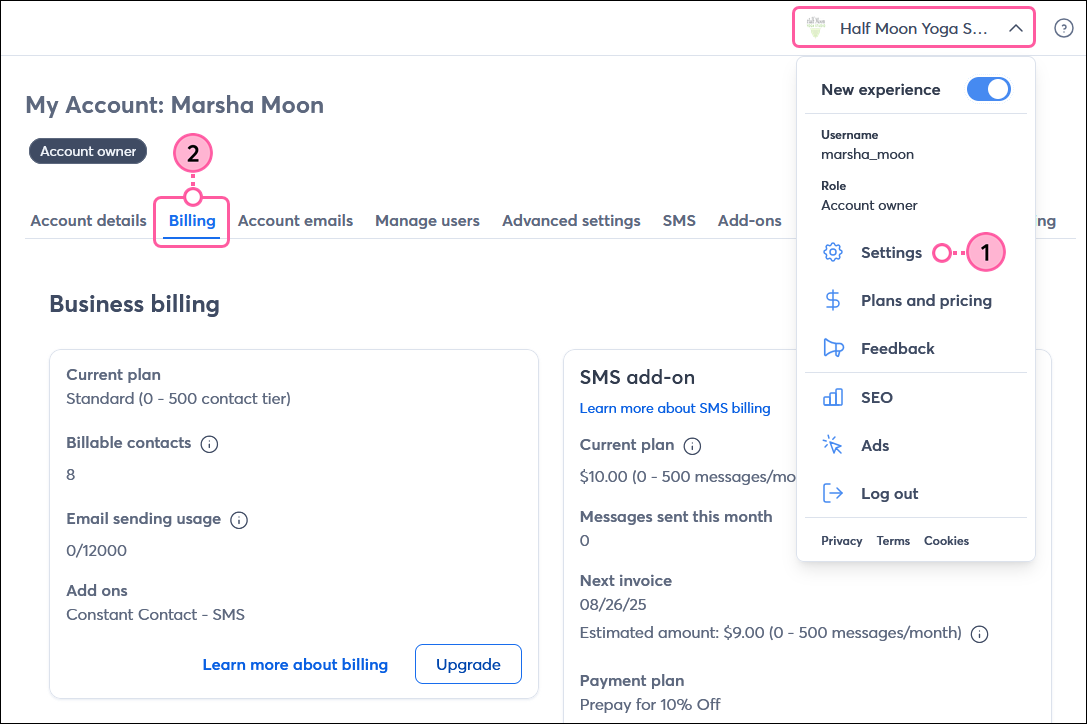
To view or update your plan, payment method, and billing information, click the profile name in the upper-right, select Settings, and then click the Billing tab.
 | Important: If you're looking for information on Constant Contact's prices, please check out the Plans & Pricing page in your account. |
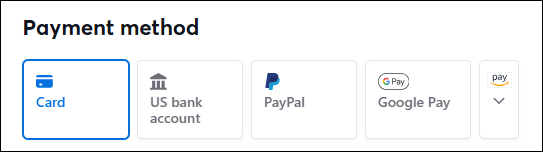
You can pay for your Constant Contact account with:
You cannot pay with cash, and Constant Contact does not accept Purchase Orders for payment.
Note: A valid payment method must be on file at all times. If your payment method fails, your account is placed on hold until payment is arranged. After 75 days of non-payment, your account will be canceled.
Currently, Constant Contact accepts these currencies:
Important: The account currency is automatically selected for you based on your location when you create your Constant Contact trial account. While in trial, you can change the currency in your account if needed. However, the currency cannot be changed once you’ve made a payment through your account.
When you choose a monthly payment plan, your payment method on file is automatically charged each month. The amount you pay is based on a combination of:
You're charged monthly, regardless of whether you send a campaign. Learn more about how you're billed for Constant Contact.
| For customers in India: Effective October 1, 2021, banks in India can no longer process auto-renewal transactions exceeding 5,000 rupees without additional consent from account holders. As a result, customers in India must select a 6- or 12-month prepay option. |
Constant Contact offers discounts if you pay for a 6- or 12-month subscription:
Copyright © 2026 · All Rights Reserved · Constant Contact · Privacy Center