A pop of color can help content stand out from the rest of your email. It's a great way to highlight your key points or call-to-action using your brand colors!
 | Design tip: Your template uses blocks, layouts, and sections to help organize your content. The way you group your content together helps you to determine how to use color to organize your points and highlight your |
Each block has its own editing panel that you can use to change the background color independently of the template-wide colors you set from the Styles tab.

When you change the background color of an individual block, it will no longer update when background color changes are made in the Styles tab. If you change the color of an individual block and later move it into a layout, it takes on the color of the layout.
| Design tip: Create a simple border around an image by resizing the image to be smaller than the block, allowing the background color to show as the border. You may need to adjust the image padding or crop the image to achieve the right ratio. |
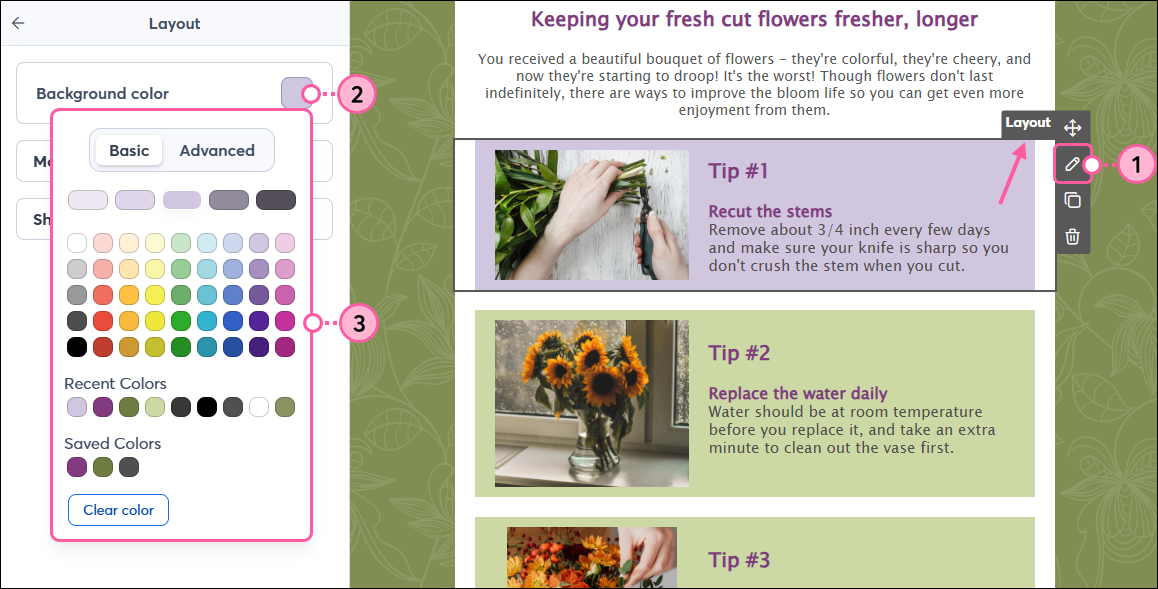
A layout is a group of individual blocks combined into their own row. You can drag prebuilt Layout blocks from the Content tab into your template, or build your own layout. The Styles tab lets you control the background colors throughout your template, but you can also change the background color of an individual layout using the Layout menu. Keep in mind that when you change the background color of an individual layout, it will no longer update when background color changes are made in the Styles tab.
| Design tip: Depending on the template you're working in, some Layouts may contain a border or other design element that can't be removed. If you don't want them, recreate the layout by dragging Text, Image, and Headline blocks into your email. |
Any links we provide from non-Constant Contact sites or information about non-Constant Contact products or services are provided as a courtesy and should not be construed as an endorsement by Constant Contact.
Copyright © 2026 · All Rights Reserved · Constant Contact · Privacy Center