Email and Digital Marketing
How can we help you?
Search our help articles, video tutorials, and quickstart guides

You've got this. You've got us. Search our Knowledge Base to quickly find answers to your questions.

Using the audience growth center

Article: 000006299
Updated: January 7, 2026

Keep track of your contact growth and explore methods for growing your list sign-ups using Constant Contact's list growth tools


Need a little help growing your contact list? You've come to the right place! Our growth center showcases your audience growth by showing you the number of contacts that joined your list AND the number of new social followers you've accrued in your linked social accounts over the past 30 days. It also gathers all the list growth tools you need in one place, and offers customized tips so that you can start making strides.


Megaphone IconBe a better marketer: Want to learn more about list growth? Check out How to Build an Effective Email List!


Access the audience growth center

Finding the growth center couldn't be easier:
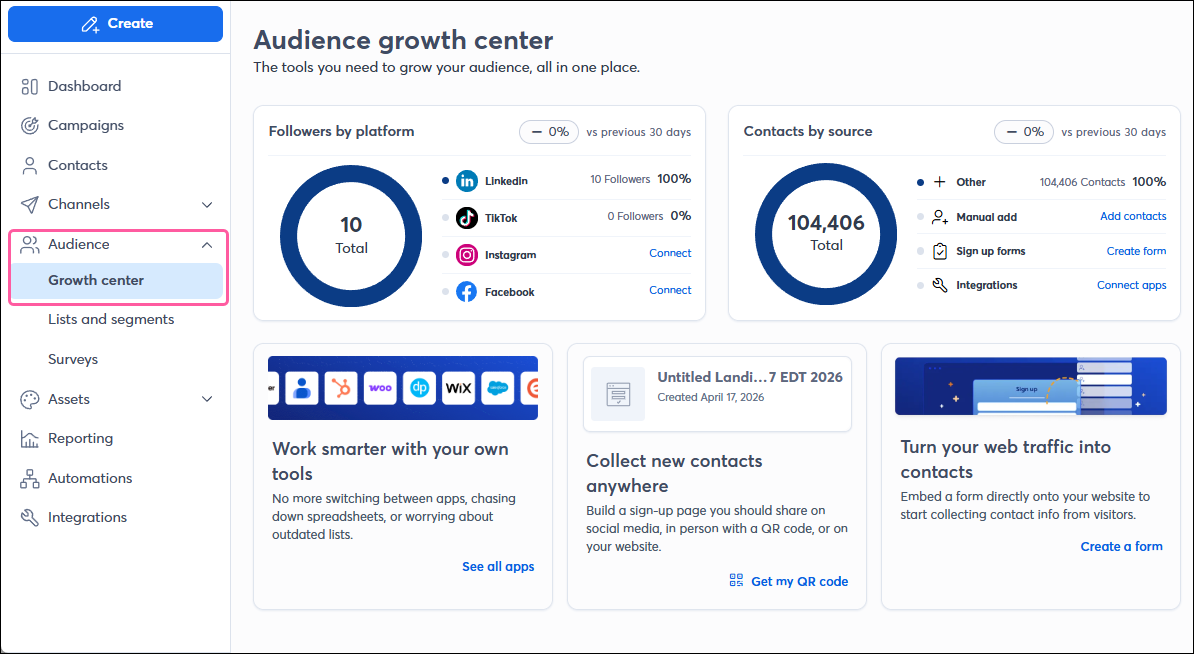
  1. In the menu on the left-hand side, click Audience > Growth center.

    Audience menu expanded with Growth center option selected, Audience growth center page with Followers by platform section and Contacts by source section


Use list growth tools

We have tons of tools that you can use online or in-person to grow your list! We break them down into two sections so you can see the tools that are the most essential, but you can also see the rest of the different ways you can grow your list; some tools even allow you to collect SMS contacts too! Don't be afraid to try something new:

  • Apps - If you have contacts in other platforms, you can easily import them into Constant Contact through a variety of apps and integrations.
  • Ads - Ads let you pick your demographics to reach a targeted audience and specify an ad budget on Facebook, Instagram, and Google. Every ad allows you to specify a URL that you want your target audience to interact with. The link can be a page on your website with an embedded sign-up form, or a link to your Sign-up Landing Page.
  • Landing pages - A Sign-up Landing Page is the quickest and easiest way to entice contacts to join your list online. And it's SMS compatible! Just create your landing page, then share the URL anywhere!
  • Lead magnet - Lead magnet helps you turn your social media contacts into email marketing contacts, giving you more control over how you can share your content with them!
  • QR codes - Each Sign-up Landing Page that you create has a unique QR code assigned to it. You can use the QR code image in your print media, include it in emails and social posts, or share it anywhere else online to point your audience back to your landing page.
  • Social media - Social posts get your sign-up form in front of an audience that you don't really have any control over and turn it into subscribed contacts that you can manage with segmentation and targeted content.
  • Text-to-join - When you register for SMS marketing, it gives you the ability to collect contacts that opt into both email and SMS marketing from wherever you are. You can share the instructions in a physical location or online!
  • Website forms - These sign-up forms can be embedded on your own website, and you can customize the sign-up messaging depending on the page content. We offer banner, flyout, inline, and pop-up form styles.

Light Bulb IconDid you know? Your list growth strategies might change over time. We can help you as a new marketer, as your organization grows, and even when you have lots of experience under your belt!


Manage your growth campaigns

All of your growth-oriented campaigns are available in one place, allowing you to preview, make edits, publish, and deactivate them as needed. You can filter your campaign types and statuses to help you find just the campaign you're looking for too.
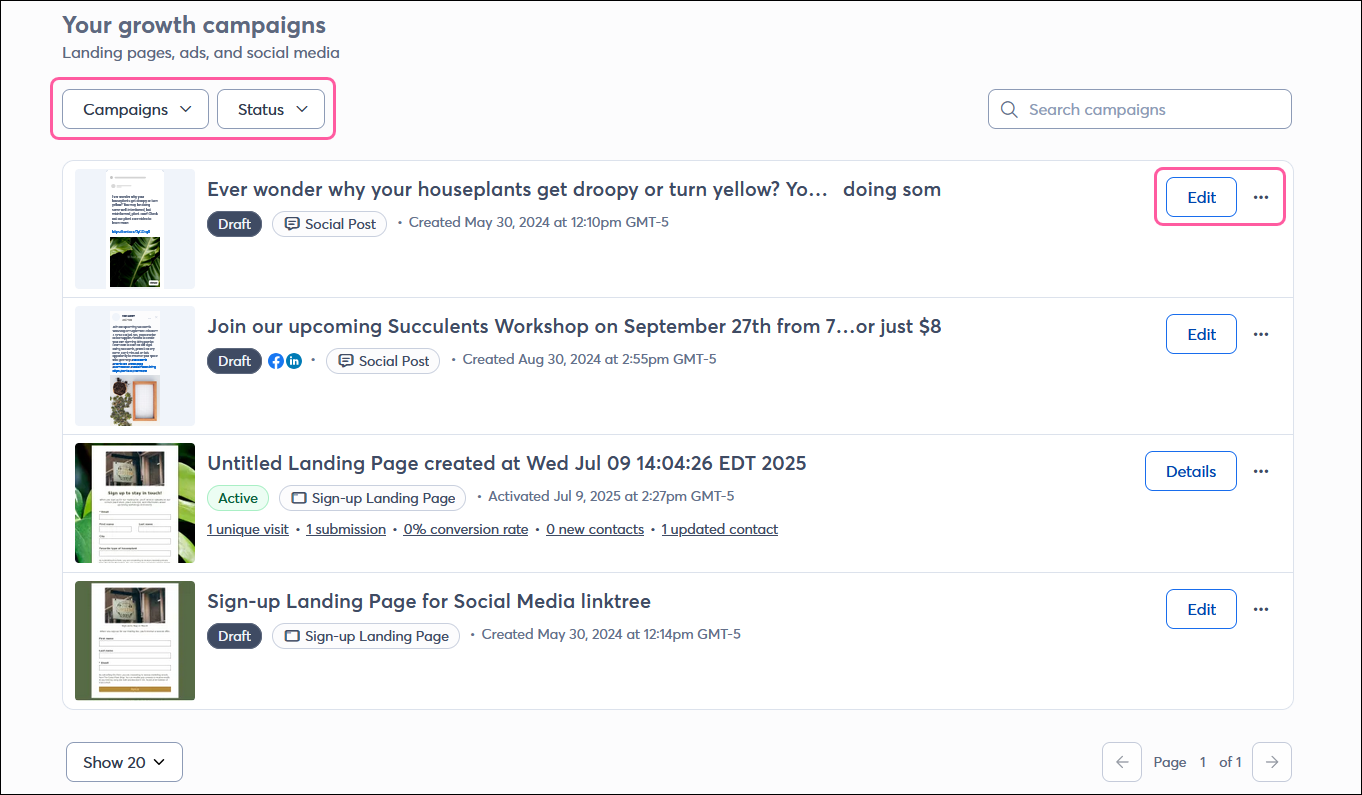
Audience growth center page with Your growth campaigns section with filter options and campaign Details button and menu button


Questions?

Ask the Community

Did this article answer your question?


Constant Contact Logo

Copyright © 2026 · All Rights Reserved · Constant Contact · Privacy Center