 | Want to learn more before getting started? If you think Constant Contact's integration with Blackbaud Raiser's Edge NXT might be right for you, click here to learn more about how our tools can help you better manage and engage with your donors. |
Once you've imported constituents from Blackbaud Raiser's Edge NXT (RENXT) into Constant Contact and begun sending them email campaigns, it's beneficial to track which constituents are engaging.
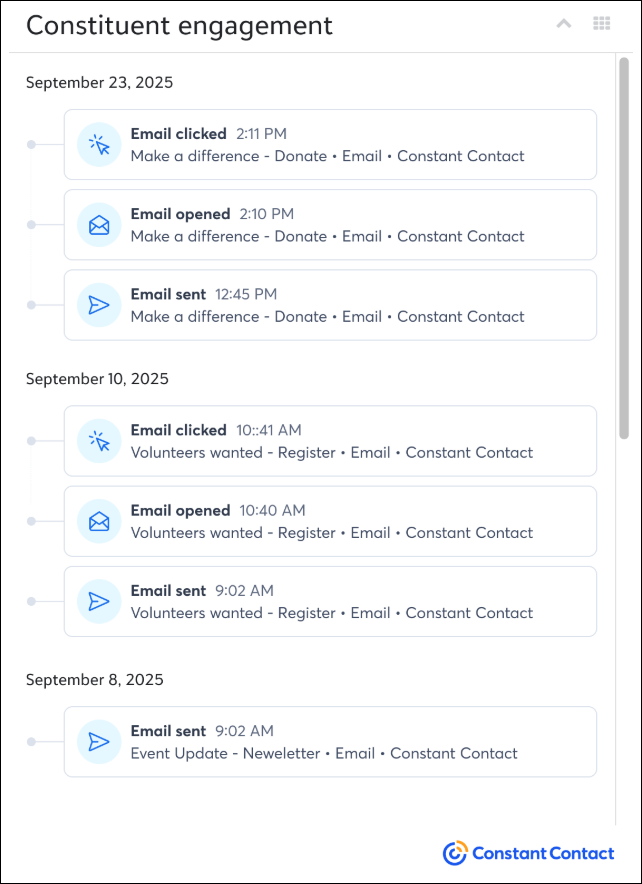
The Constituent Engagement Add-In within your RENXT account displays Constant Contact email engagement data directly within a constituent record. The last 100 activities from the previous 30 days for email sends, opens, and clicks display in a list, which updates automatically. Easily see if a constituent is engaging, directly within your RENXT account. Please note that, at this time, unsubscribes will not display within the Add-In.
To view the Add-In, navigate to a constituent's record. You'll see a section within the record titled Constituent engagement. The email activity is sorted by date, and for each piece of activity, you can see the:
 | Want to improve engagement? Use field mapping when importing constituents so that key pieces of contact information are stored within your Constant Contact account. Use that information to add personalization to your emails, send automated emails based on things like birthday or membership date, and send tailored messaging to groups of contacts segmented by specific criteria. |
Copyright © 2026 · All Rights Reserved · Constant Contact · Privacy Center