 | Want to learn more before getting started? If you think Constant Contact's integration with Blackbaud Raiser's Edge NXT might be right for you, click here to learn more about how our tools can help you better manage and engage with your donors. |
When importing constituents from Blackbaud Raiser’s Edge NXT (RENXT) into Constant Contact, you can select which fields you'd like to map. The integration currently supports 55 redefined constituent fields. Some map automatically, while others require a Constant Contact custom field. Below you’ll find a full list of supported fields, including which are mapped by default.
Using field mapping to power Automation and Segmentation
The integration supports 55 predefined RENXT constituent fields. These include default fields and manually mapped fields.
 | Important: RENXT custom fields (attributes you create yourself) are not supported and cannot be mapped into Constant Contact. |
Default mapped fields
Manually mapped fields
These fields are supported, but you must first select them from the "Add new field" dropdown and then create or select a Constant Contact custom field before mapping.
Mapping rules
Where to locate the fields when importing
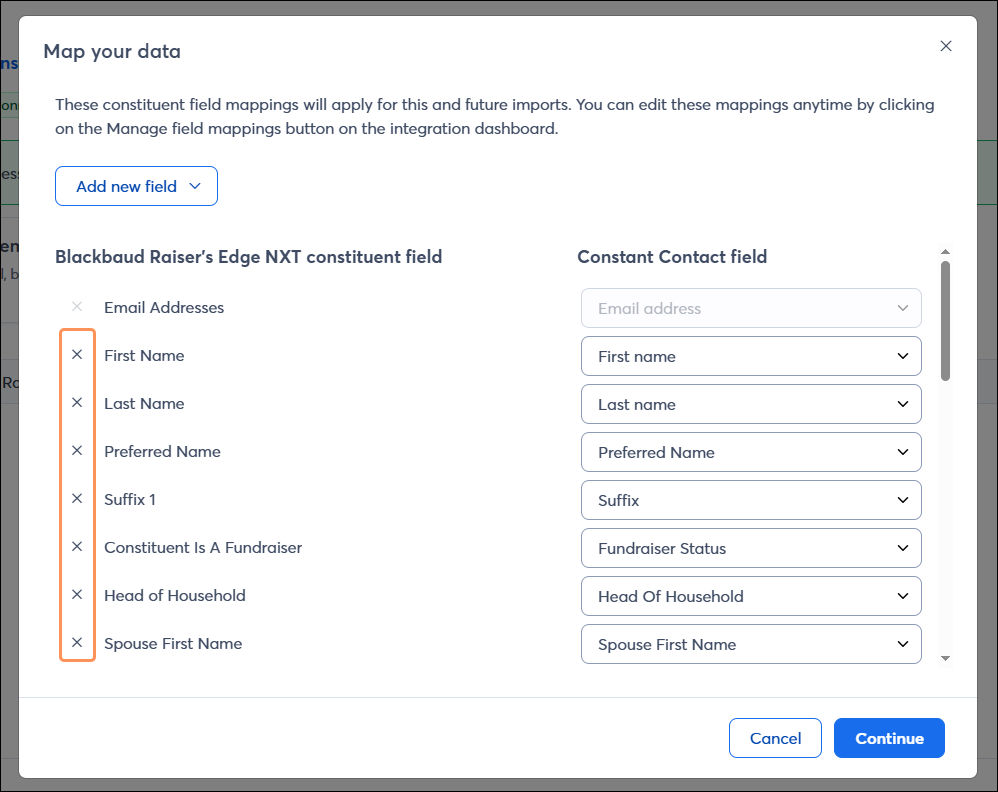
When you create an import, you'll be brought to a "Map your data" screen. Here, all 55 RENXT fields are available in the Add new field dropdown. You can choose which ones to bring into Constant Contact.
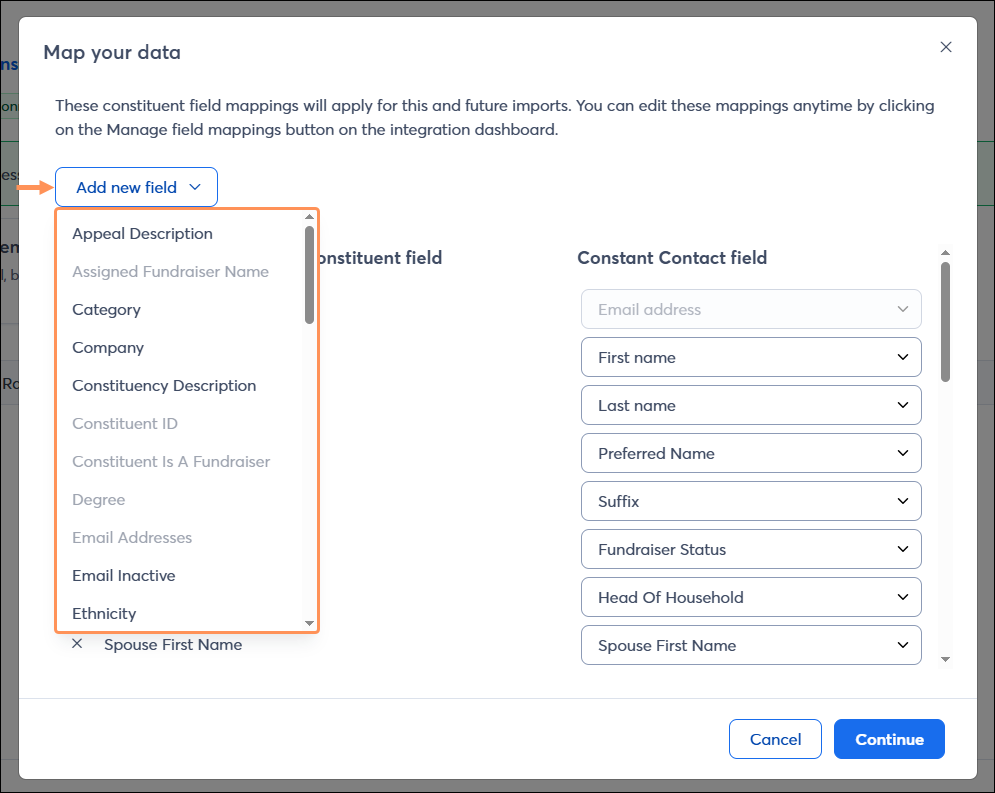
You have full control to add or remove fields from your mapping as needed, allowing you to sync only the desired fields.
|
# |
Domain |
RENXT Field |
Constant Contact Field |
Default Mapping? |
|
1 |
Contact / Address |
First Name |
First Name |
Yes |
|
2 |
Last Name |
Last Name |
Yes | |
|
3 |
Street Address |
Street |
Yes | |
|
4 |
City |
City |
Yes | |
|
5 |
State |
State |
Yes | |
|
6 |
ZIP |
ZIP |
Yes | |
|
7 |
Country |
Country |
Yes | |
|
8 |
Phone Number |
Phone - mobile |
Yes | |
|
9 |
Email Address |
Email address |
Yes | |
|
10 |
Organization Name |
(Requires user-created custom field) |
No | |
|
11 |
Demographics / Profile |
Religion |
(Requires user-created custom field) |
No |
|
12 |
Ethnicity |
(Requires user-created custom field) |
No | |
|
13 |
Industry |
Custom Field: Industry |
Yes | |
|
14 |
Constituent ID |
Custom Field: Constituent ID |
Yes | |
|
15 |
Gender |
(Requires user-created custom field) |
No | |
|
16 |
Age |
(Requires user-created custom field) |
No | |
|
17 |
Birthdate |
Custom Field: Birthdate |
No | |
|
18 |
Title |
(Requires user-created custom field) |
No | |
|
19 |
Preferred Name |
Custom Field: Preferred Name |
Yes | |
|
20 |
Suffix |
Custom Field: Suffix |
Yes | |
|
21 |
Lookup ID |
Custom Field: Lookup ID |
Yes | |
|
22 |
Salutation |
Custom Field: Salutation |
Yes | |
|
23 |
Household / Relationships |
Head of Household |
Custom Field: Head of Household |
Yes |
|
24 |
Spouse First Name |
Custom Field: Spouse First Name |
Yes | |
|
25 |
Spouse Last Name |
Custom Field: Spouse Last Name |
Yes | |
|
26 |
Contact Status / Flags |
Phone Type |
(Requires user-created custom field) |
No |
|
27 |
Phone Inactive |
(Requires user-created custom field) |
No | |
|
28 |
Email Inactive |
(Requires user-created custom field) |
No | |
|
29 |
Requests No Email |
(Requires user-created custom field) |
No | |
|
30 |
Fundraising / Engagement |
Assigned Fundraiser Name |
Custom Field: Most Recent Active Fundraiser |
Yes |
|
31 |
Constituent Is Fundraiser |
Custom Field: Fundraiser Status |
Yes | |
|
32 |
Online Presence |
Custom Field: Online Presence |
Yes | |
|
33 |
Appeal |
(Requires user-created custom field) |
No | |
|
34 |
Membership / Education |
School Name |
Custom Field: School |
Yes |
|
35 |
Degree |
Custom Field: Degree |
Yes | |
|
36 |
Class Of |
(Requires user-created custom field) |
No | |
|
37 |
Majors |
Custom Field: Majors List |
Yes | |
|
38 |
Membership / Program |
Membership Joined Date |
(Requires user-created custom field) |
No |
|
39 |
Membership Category |
(Requires user-created custom field) |
No | |
|
40 |
Membership Subcategory |
(Requires user-created custom field) |
No | |
|
41 |
Membership Program |
(Requires user-created custom field) |
No | |
|
42 |
Events / RSVP |
Event Name |
Custom Field: Latest Event Name |
Yes |
|
43 |
Latest Event Start Date |
Custom Field: Latest Event Start Date |
Yes | |
|
44 |
Attended Latest Event |
(Requires user-created custom field) |
No | |
|
45 |
RSVP Status |
Custom Field: RSVP Status |
Yes | |
|
46 |
Giving |
Consecutive Years Given |
Custom Field: Consecutive Years |
Yes |
|
47 |
|
First Gift Amount |
Custom Field: First Gift Amount |
Yes |
|
48 |
|
Latest Gift Amount |
Custom Field: Latest Gift Amount |
Yes |
|
49 |
|
Lifetime Giving |
Custom Field: Lifetime Giving |
Yes |
|
50 |
|
First Gift Date |
Custom Field: First Gift Date |
Yes |
|
51 |
|
Latest Gift Date |
Custom Field: Latest Gift Date |
Yes |
|
52 |
Constituent Description / Codes |
Constituency Description |
(Requires user-created custom field) |
No |
|
53 |
|
Constituency Codes Active |
Custom Field: Constituency Codes |
Yes |
|
54 |
Other / IDs |
County |
Custom Field: County |
Yes |
|
55 |
Addressee |
(Requires user-created custom field) |
No |
Keep in mind
See below for ideas on how to use mapped fields in conjunction with Constant Contact's Automation Path Builder and Segmentation Builder.
Giving History
Education
Demographics & Profile
Constituency & Engagement Roles
Contact & Address
Membership
Events
Household / Relationships
New Subscriber / Contact
Constituent Added to a RENXT List
Copyright © 2026 · All Rights Reserved · Constant Contact · Privacy Center