 | Want to learn more before getting started? If you think Constant Contact's integration with Blackbaud Raiser's Edge NXT might be right for you, click here to learn more about how our tools can help you better manage and engage with your donors. |
Consent Categories, which are built within Blackbaud Raiser's Edge NXT (RENXT), play an important role when a Partner account sets up our integration with Blackbaud and imports constituents into multiple child accounts.
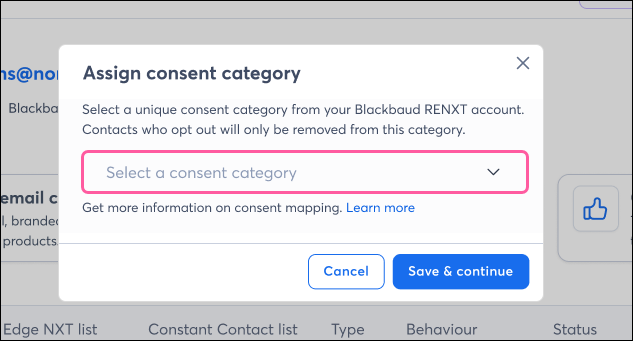
When creating an import, a RENXT Consent Category is selected, allowing each Constant Contact child account to be linked to a unique Consent Category. When a constituent unsubscribes from one category, that change applies only to that category, and not across all communications/other child accounts.
This article will cover in further detail what Consent Categories are, how they work in conjunction with constituent imports from RENXT into Constant Contact, and the benefit of assigning a Consent Category to an import within each child account.
What are Consent Categories in RENXT?
Mapping to a Consent Category during import
Benefit of Consent Category mapping
Consent Categories in RENXT are communication and channel types that are used to manage consent from constituents. These categories allow constituents to opt in or out of specific types of communications, such as newsletters, surveys, or promotional messages, across various channels like email, phone, or SMS. Consent Categories are created in RENXT and can be added to constituent records.
When setting up an import of constituents from RENXT into a Constant Contact child account, a RENXT Consent Category is selected. Each child account must be mapped to a unique category to avoid overlap. Constituents are imported only if they are eligible for that category, meaning they are opted in and not marked as “do not email” in RENXT.
When a constituent changes email status in Constant Contact, RENXT records the update under the correct Category, Channel (Email), and Source (Constant Contact).
Consent changes made through Constant Contact appear in RENXT under each constituent’s Consent History tab.
Once mapping is complete, each child account may begin sending emails. Because the child account is tied to a particular Consent Category, if a contact/constituent unsubscribe from that category, they won't also be unsubscribed from emails coming from other child accounts tied to other categories.
Typing Consent Categories to each child account allows your organization to manage different types of emails — like newsletters, event invites, and fundraising appeals — each with its own consent category. You can send from each child account confidently, knowing that if a contact/constituent stops one category, others remain active. Each Constant Contact child account gets its own voice — and consent stays local to that voice.
For example, if a contact/constituent unsubscribes from “Event Invites,” they can still receive “Monthly Newsletters” or “Donation Thank-Yous.”
Benefits include:
What if my child accounts are already connected to RENXT but do not have a Consent Category assigned?
Any existing imports from RENXT to Constant Contact will continue to run as is. Going forward, any new imports created will require a Consent Category to be selected.
What happens if a RENXT Consent Category is deleted or renamed?
The connected Constant Contact child account is automatically paused and disabled for sending. A banner prompts the user to re-assign the category before resuming. Our support team will assist with re-mapping and re-enabling the account.
What happens if a Child Account is disconnected from RENXT?
This should only be done under guidance from our support team. The child account is immediately disabled and cannot send emails or automations. It remains disabled until relinked to the same RENXT category with assistance from our support team.
 | In need of multiple accounts? Our multi-account solution is designed for organizations seeking unique accounts for their various locations, departments, or users. Take advantage of bulk pricing, product features for brand control, customized onboarding, and more! |
Copyright © 2026 · All Rights Reserved · Constant Contact · Privacy Center