Not all social media platforms are exactly the same! Knowing their similarities and differences helps you to use social posts to create content for each platform, or content that performs well on multiple social platforms.
General best practices
There are some similarities in creating and sharing posts on all the different social media platforms:
- Know your audience - When you know the kind of content your audience likes and when they are more likely to engage with your content, you'll be more successful when you post. It may be tempting to try and get as many new followers as possible. Still, a better strategy is cultivating an audience of engaged followers because they're more likely to share and keep returning for more content. Over time, you may notice trends for your specific audience that you can work from.
- Keep it short and specific - Social posts get more engagement when they're short. If you have lots to say, you can break it into pieces and spread it out over time so that each post has a clear goal for engagement. You can really get creative when your posts come in a well-planned series.
- When in doubt, ask - To build a loyal following, you have to constantly connect with your audience. Including a call-to-action that invites your audience to engage can open the door for likes and comments. Ask a question, use a fill-in-the-blank statement, invite feedback, or ask your followers to share your post with someone they think might enjoy it.
- Use hashtags wisely - Hashtags are how your post gets seen outside your immediate audience. Popular hashtags start to trend, and content with trending hashtags becomes more visible to those searching for it. Create your own brand hashtag and always include it in your posts, then include related industry hashtags that are currently trending to ensure your post gets seen. Our social post editor includes hashtag groups so you can create hashtags and quickly add them to your posts.
- Occasionally incorporate emojis—Facebook, Instagram, LinkedIn, and TikTok allow for emojis in post bodies and comments. They're eye-catching, especially if they aren't overused. Our social post editor includes a menu of standard emojis that are universal to most social media platforms, so they're less likely to display as an empty square like unsupported emojis do.
- Video content gets the most engagement - Short-form video content performs well, especially on Instagram and TikTok. Most social media platforms even have dedicated feeds so users can view video content separate from regular posts. Our social post editor includes short-form video as a media option for your posts.
- Encourage your audience to become contacts - Your social media audience is a great place to look for new contacts. You can't control who sees your content on social media. Still, when your audience opts into your list and becomes an official contact, you can send targeted email and SMS messages to engage them further. Our social post editor lets you easily share emails and landing pages within your posts, and you can link custom "link in bio" landing pages that point your social audience to your sign-up form.
Best practices for Facebook
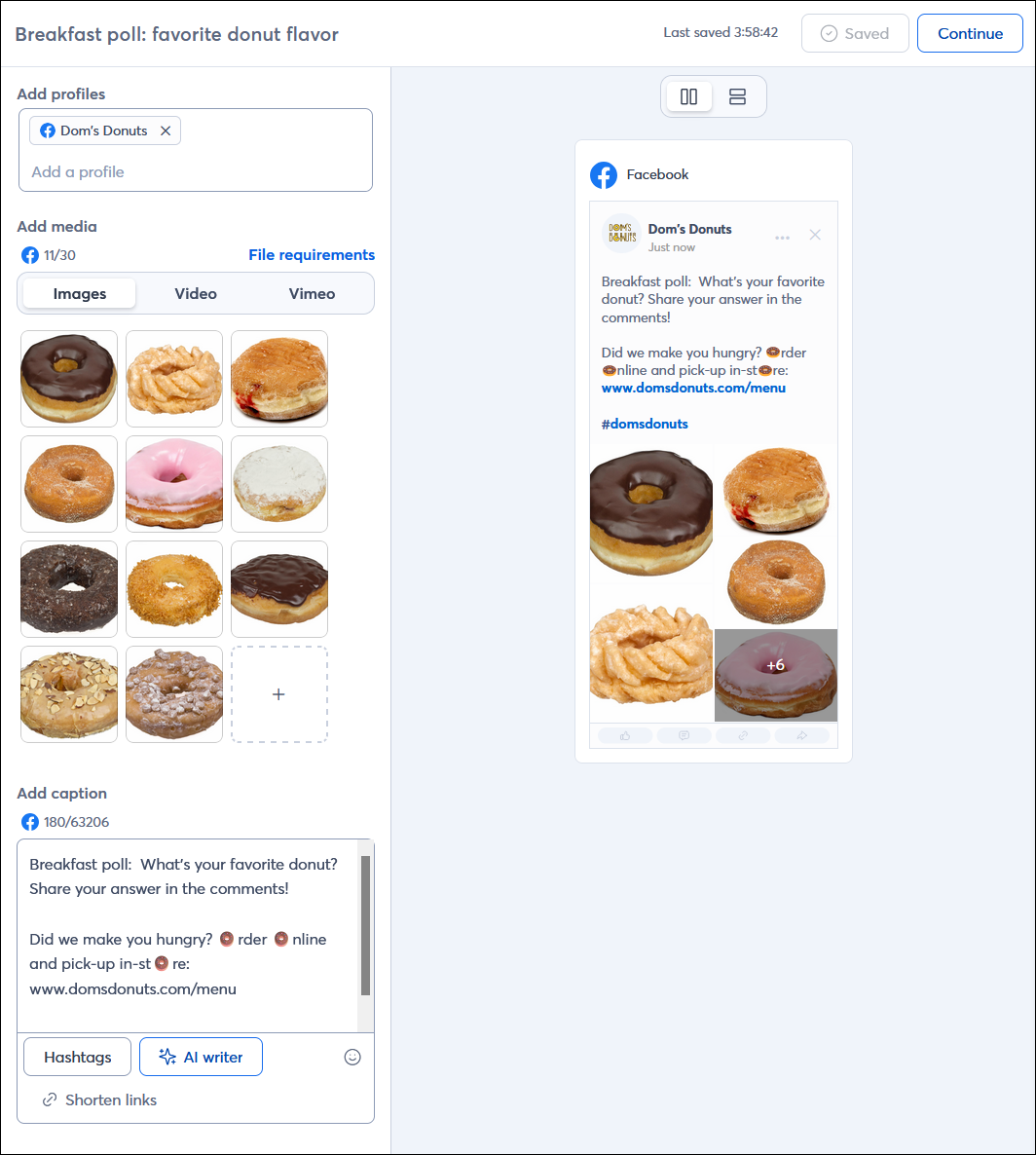
Facebook is a connection-based social network where you build a network of friends who share information with each other. Facebook has the largest audience and a more global reach than other platforms. Facebook users are looking for facts about your organization, but sharing curated content from other sources is acceptable. Information shared on Facebook changes quickly.
- Facebook images - Original images do well on Facebook, but you also have more freedom to share charts, infographics, and images from other sources. (Text appears above an image because the text is the main focus of the post.)
- Stick to the facts - By curating the information you share on your business page, you can take advantage of the nice things others say about you to enhance what you say about yourself. Did someone write about you in the local paper? Share the article. Do you have news about your organization? Share an update. Did someone post a nice message about your organization to their news feed and tag you in it? Share it to your business page and respond to it.
- Post length - Stick to fewer than 250 characters. A "see more" link appears when you reach 477 characters.
- Using URLs - Facebook allows clickable links and auto-generates a link preview. If you choose to add images to your post, it overrides the preview so you can better control what your audience sees.
- Best time to post—In general, Facebook usage increases around midday during the week, so plan your posts for when your audience is most likely to be online.
For more information about creating posts for Facebook, please see Facebook's Support.
Best practices for Instagram
Instagram is an open social network where everyone can see and search for everything. Instagram users are younger and tend to have higher engagement, partly because Instagram is designed to keep users from leaving the app. They want to be wowed by your organization and prefer original and inspirational content. Information shared on Instagram changes quickly.
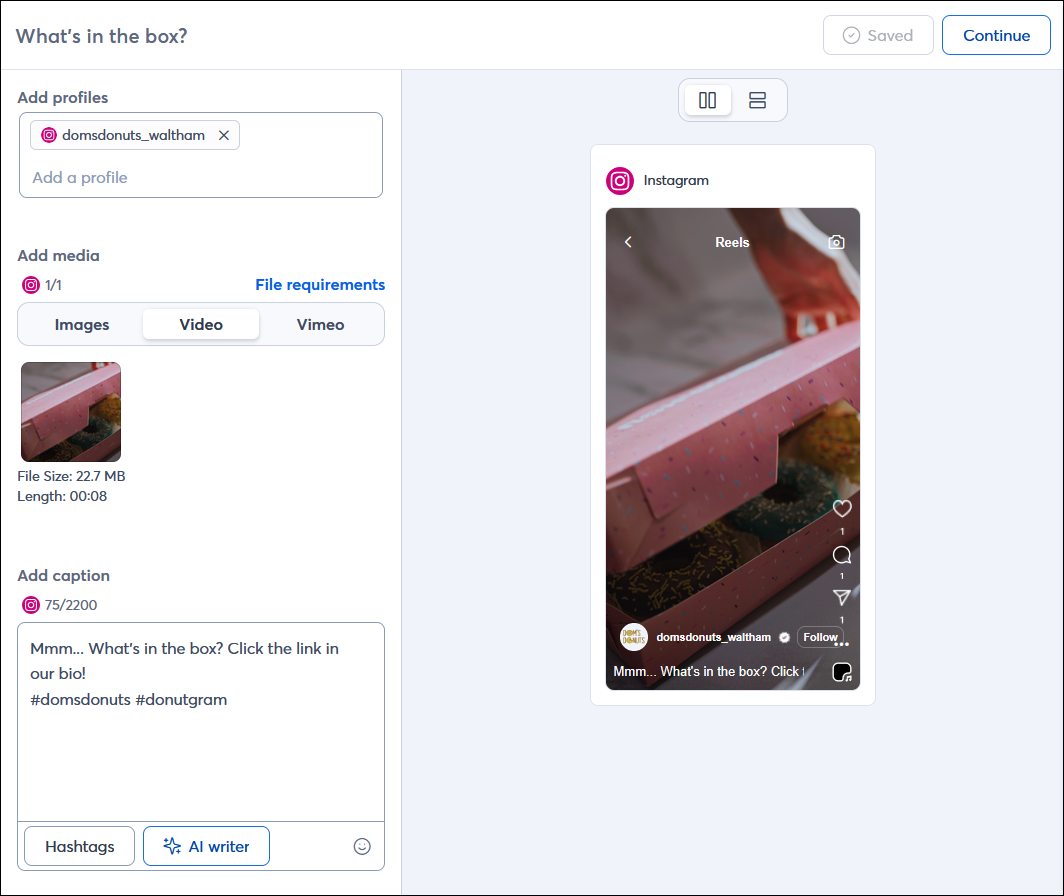
- Instagram images - Instagram is a visual platform that helps you capture a moment, so the images you share are key! Images should be original, high-quality, and tell a story. You could just share an image of your product, but an image of someone actually using it is even better for driving a point across with much less text. (Text appears below an image because the image is the main focus of the post.)
- Instagram Reels - Because Instagram is such a visual platform, short-form videos do really well; a user can even click the Reels option to view nothing but video content! You can still see text when you view the Reel, but it's best to keep it to a minimum.
- Instagram hashtags -Instagram allows up to 30 hashtags, but don't go overboard with them! Too many hashtags looks spammy, especially if they aren't related to your content or brand.
- Mix up your messages - If you're always promoting your organization, you will lose some of your audience. Instagram users love inspirational and emotional content that evokes their passions. Spend time showing your audience how you fit into their ideal lifestyle and make them feel like they're a part of that lifestyle. A great way to do this is to ask your audience for pictures of themselves using your products or services and then share them with your audience.
- Post length - Stick to fewer than 138 characters and let your images do most of the work to tell your story. A "read more" link appears after you reach 125 characters.
- Using URLs - Instagram doesn't allow clickable URLs within the post content. If you do add a URL to a post, it appears as plain text that can be copied and pasted, but it's not likely to get much engagement. It's better to take advantage of your Instagram Bio, where you can include a landing page with links to the most important places around the web where you want to drive your audience.
- Best time to post - In general, Instagram usage increases on weekend evenings, so plan your posts for when your audience is most likely to be online.
For more information about creating posts for Instagram, please see Instagram's Support.
Best practices for LinkedIn
LinkedIn is a connection-based social network designed for business professionals and freelancers to network, share industry information and expertise, post job listings, share resumes, and advertise. LinkedIn users are much less likely to check their feed multiple times a day, like Facebook or Instagram users, and are more likely to visit daily, weekly, or just a couple of times per week. Information shared on LinkedIn changes more slowly. Since the volume of posts is also less, your post stays visible for longer.
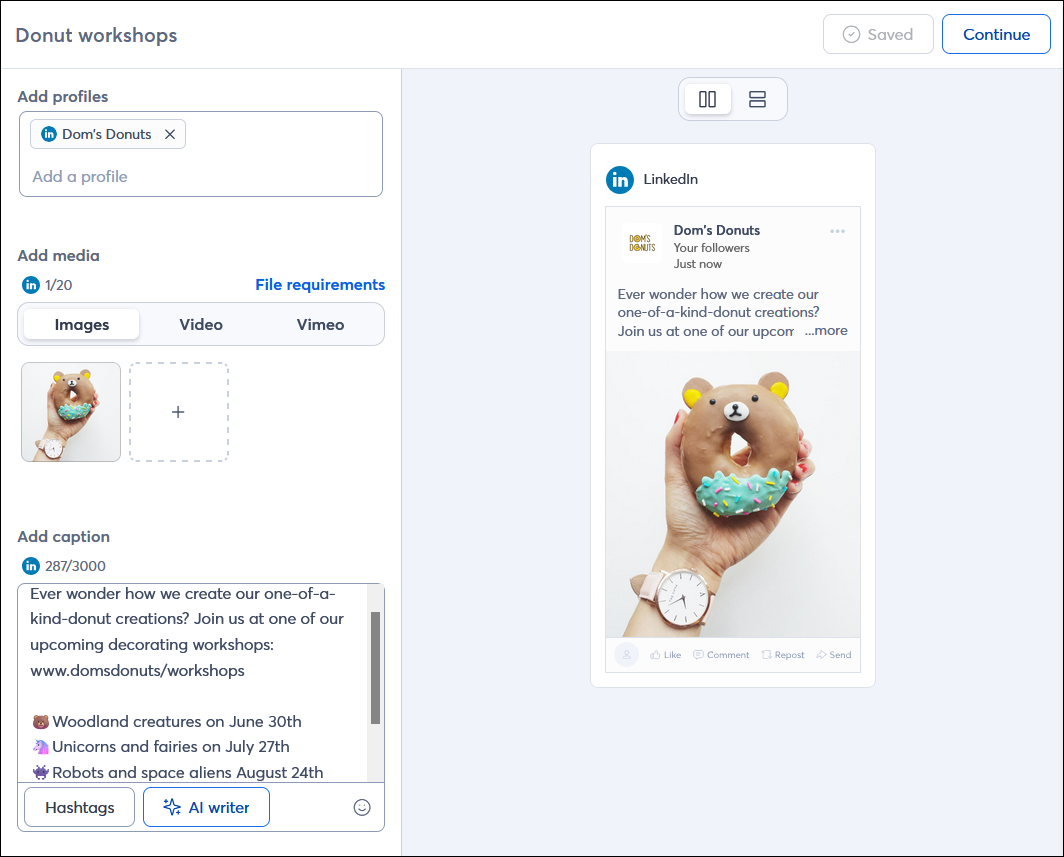
- LinkedIn images—Images on LinkedIn should be professional and related to your business in some way. Posts that include an image are more eye-catching and attract more interest.
- LinkedIn hashtags - LinkedIn doesn't restrict the number of hashtags you can share in a post, but its algorithm can treat a post with too many hashtags as spam; sticking to under five is best.
- Get down to business - The information you share on LinkedIn should be related to your organization, industry, or community in some way. LinkedIn users are busy professionals looking for solutions your organization can provide, how you're tackling an industry-wide challenge, or to grow their network, so your post content should offer value.
- Post length - LinkedIn gives you 700 characters for posts from a company page. A "see more" link appears when your post is longer than three lines of text.
- Using URLs: LinkedIn allows clickable links and auto-generates a link preview. If you choose to add images to your post, the preview is overridden, allowing you to better control what your audience sees.
- Best time to post - LinkedIn usage is generally heaviest towards the end of the week and in the morning. Sundays are the slowest days for usage. Plan your posts during your regular business hours, when you're available for customer service, and check on your posts regularly.
For more information about creating posts for LinkedIn, please see LinkedIn's support.
Best practices for TikTok
TikTok is first and foremost a video-sharing platform, and the content is endless and changes rapidly. TikTok's largest audience is people under the age of 30 who want to be entertained or learn time-saving tips, but interest in the news is also growing. DIY tutorials thrive here! TikTok users also spend the longest time viewing this platform compared to other platforms, making it easier for content to go viral for those with a smaller reach.
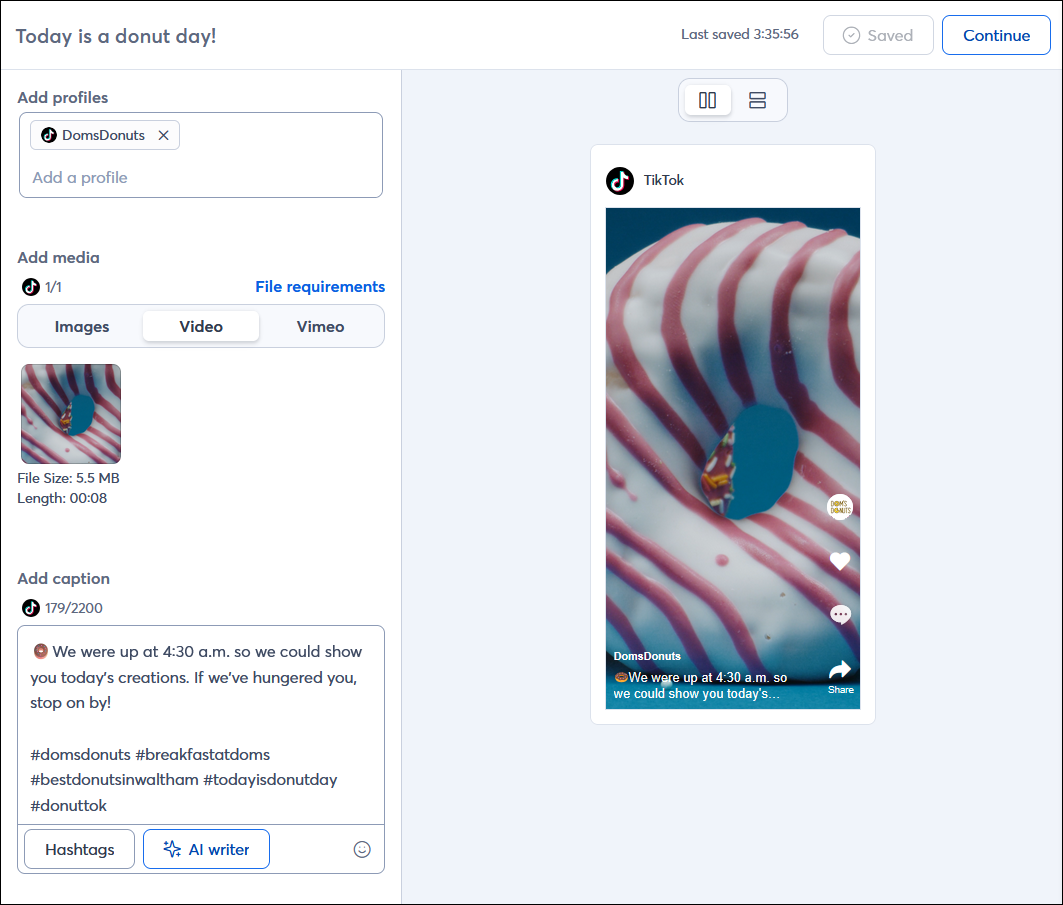
- TikTok videos - Video content performs the best on TikTok! The TikTok app is oriented vertically, so take advantage of vertical/portrait videos that fill up the whole screen of a mobile device. TikTok videos can range between 15 seconds - 10 minutes in duration, but the limit is set for each individual user by TikTok.
- TikTok images - In TikTok, images take a back seat to short-form videos, but when you post a group of images, you can set them to music. Please note that only JPG images are compatible with our social post tool for TikTok.
- TikTok hashtags - TikTok allows users to add a maximum of 5 hashtags per post. Since you're allowed so few compared to other social platforms, keep them relevant! A mix of hashtags that refer specifically to you and broader hashtags currently trending gives you the best reach.
- Be entertaining - The longer TikTok users watch your videos and look at your content, the better. Your content should be short, but entertaining above all else, giving you a chance to get creative.
- Post length - The video content is the most essential part of your post, so keep your text short and to the point.
- Using URLs - TikTok doesn't allow clickable URLs within the post content. A better call-to-action is to direct your audience to click the link in your bio; you can link to your official webpage, or a landing page with a curated selection of links.
- Best time to post - Since TikTok's largest user group is under the age of 30, activity picks up in afternoon and evening hours (after school and work), with usage spiking in the middle of the week or on weekends.
For more information about creating posts for TikTok, please see TikTok's support.
Any links we provide from non-Constant Contact sites or information about non-Constant Contact products or services are provided as a courtesy and should not be construed as an endorsement by Constant Contact.

