We're making it easier to get around Constant Contact with a brand new left navigation. Not all accounts have that change yet, so if your navigation looks different from our articles, that's why–but everything from the top can now be found on the left!

Email and Digital Marketing
How can we help you?
Search our help articles, video tutorials, and quickstart guides

You've got this. You've got us. Search our Knowledge Base to quickly find answers to your questions.

View the results of a social post

Article: 000033132
Updated: October 1, 2025

Get a sense of how your social posts and short-form videos are performing on Facebook, Instagram, LinkedIn and TikTok by viewing your overall reach and engagement activity for individual posts

The more you use social media, the more your audience and engagement grows! After you've created and shared a post or short-form video on Facebook, Instagram, LinkedIn, or TikTok, you can check your reporting to see how your post is performing, and see how your social reach and engagement are growing too.
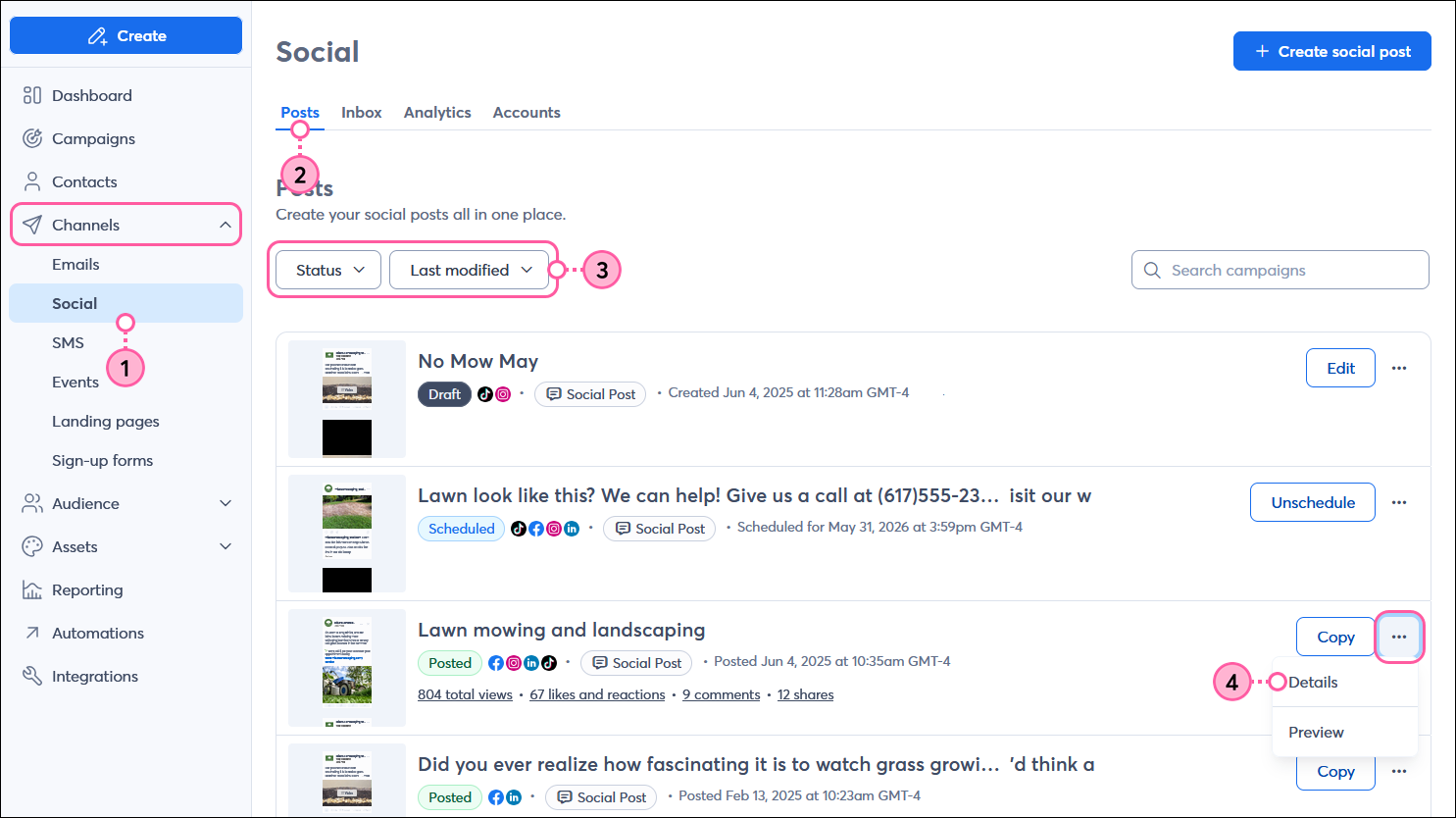
  1. In the left-hand menu, click Channels > Social.
  2. Click the Posts tab.
  3. (Optional) To help narrow your search:
  • Select "Posted" from the Status menu.
  • Select an option from the Sort By menu.
  1. Next to your "Posted" social post, click . . . > Details.

    Channels menu expanded with Posts option selected, Social dashboard with Posts tab selected, Status drop-down menu and Sort By drop-down menu, and Posted social post with menu expanded and Details option selected

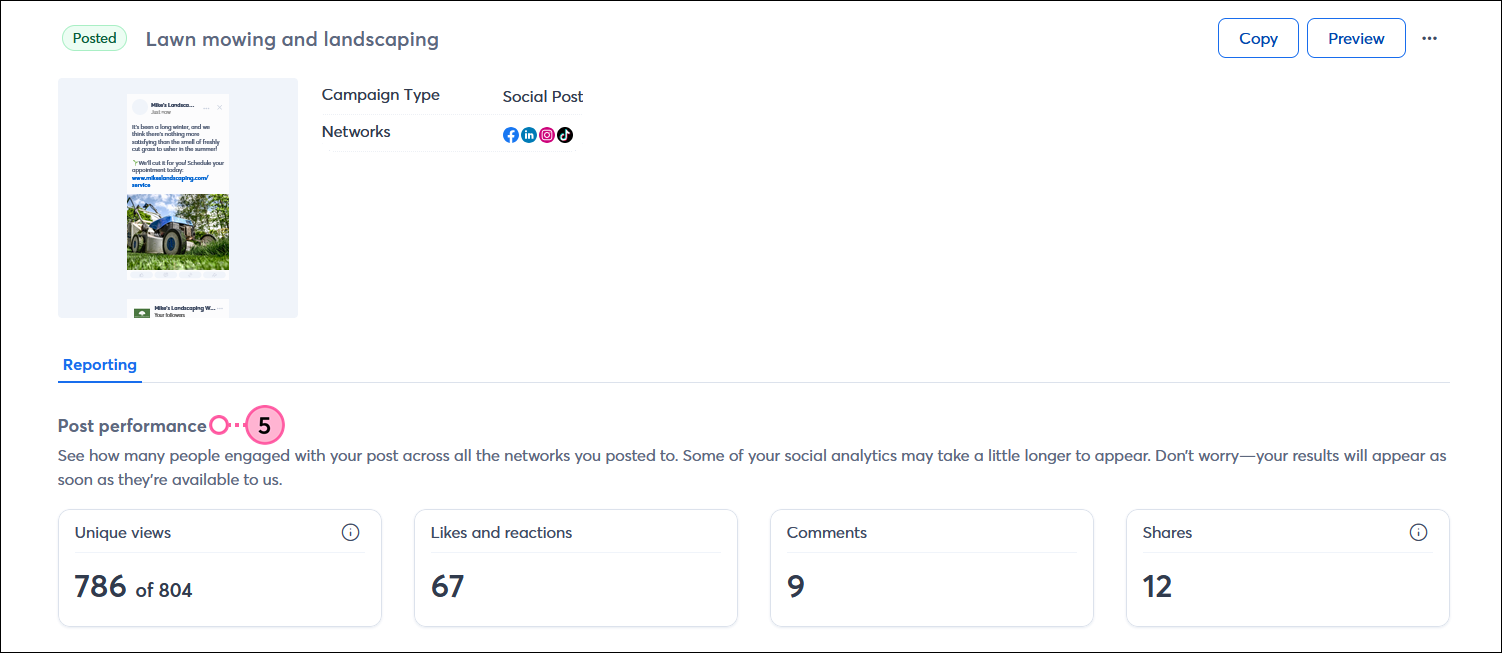
  2. From the Post performance section of the Reporting tab, you can see the following combined metrics for Facebook, Instagram, LinkedIn, and TikTok:
  • Unique views - This shows you the total number of unique people who viewed your post compared to the total number of times your post was viewed across Facebook, Instagram, and TikTok. LinkedIn doesn't provide unique views, but is included in the total views.
  • Likes and reactions - This shows you the total number of times that Instagram and TikTok users liked your post by clicking the heart icon, or Facebook and LinkedIn users reacted to your post by selecting a thumbs up, or other emoji.
  • Comments - This shows you the total number of comments left on your post by Facebook, Instagram, LinkedIn, and TikTok users.
  • Shares - This shows you the total number of times that Facebook, Instagram, LinkedIn, and TikTok users shared your post with their own audience. 

    Social post details page with Reporting tab selected, Post performance section with Impressions, Reach, and Engagements metrics

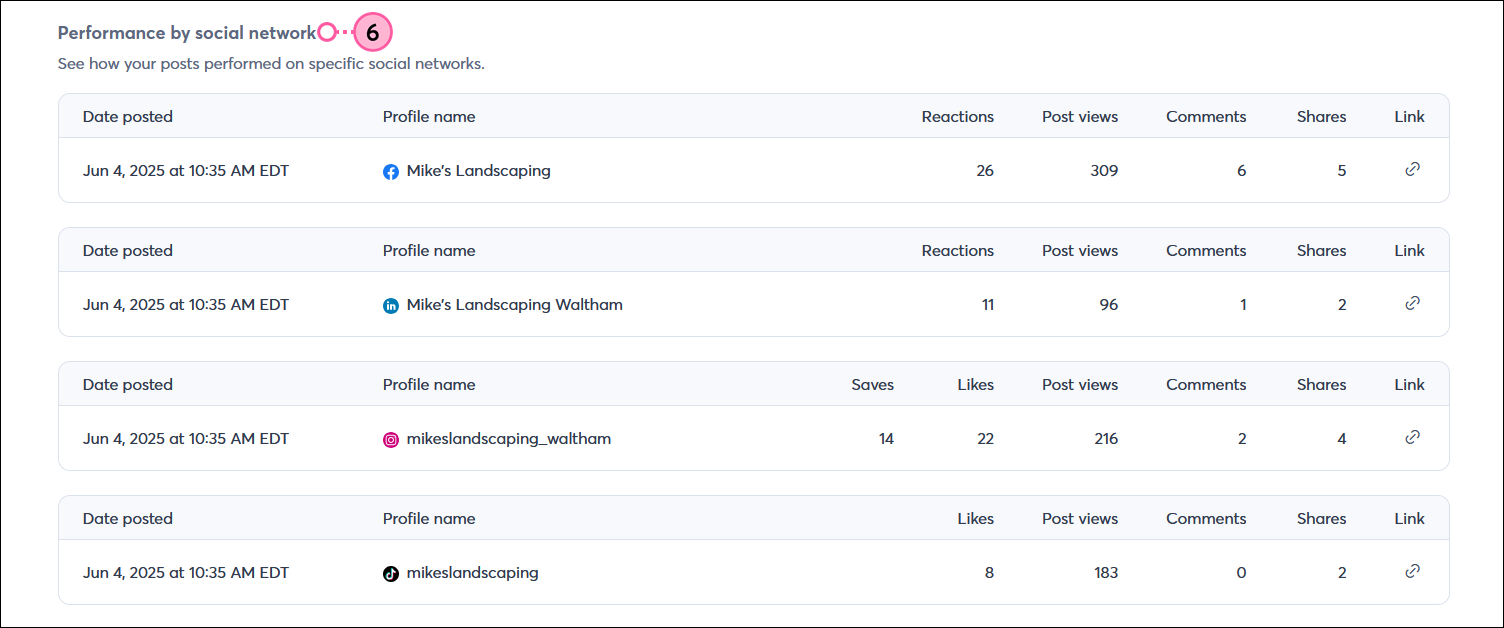
  1. Review how a post performed on each social network
  • Comments - This shows you the number of text comments that Facebook, Instagram, LinkedIn, and TikTok users write in response to your post.
  • Likes - This shows you the number of times Instagram and TikTok users clicked on the heart icon for your post.
  • Post views - This shows you the total number of times that Facebook, Instagram, LinkedIn, or TikTok users saw your post. If a person viewed your post more than once, it's counted as another post view.
  • Reactions - This shows you the total number of times Facebook users clicked the "like," "love," "care," "laugh," "wow," "sad," or "angry" icons for your post, or the number of times LinkedIn users clicked the "like," "celebrate," "love," "insightful," or "curious" icons for your post.
  • Saves - This shows you the total number of times Instagram users have saved your post to find again later.
  • Shares - This shows you the total number of times Facebook, Instagram, or LinkedIn users have shared your post with people in their network.

    Social post details page with Reporting tab selected, and Performance by social network section with Facebook, Instagram, and LinkedIn metrics

Monitoring the conversations that happen on your social media pages and responding to comments helps your engagement and reach to improve. You can respond to comments on Facebook and Instagram through your Constant Contact account, and you can respond to comments on LinkedIn and TikTok directly through your social media accounts.

For more information about post performance, please see Facebook's support, Instagram's supportLinkedIn's support TikTok's support.


Megaphone IconBe a better marketer: Not seeing the results you were hoping for? Don't worry! It can take a little bit of time to grow an engaged audience. Check out our best practices for creating social posts, and learn how to market your brand on social media and build authority on LinkedIn!


Any links we provide from non-Constant Contact sites or information about non-Constant Contact products or services are provided as a courtesy and should not be construed as an endorsement by Constant Contact.


Questions?

Ask the Community

Did this article answer your question?


Constant Contact Logo

Copyright © 2025 · All Rights Reserved · Constant Contact · Privacy Center