 | Tip: Are you looking for information about Constant Contact’s Email and Digital Marketing product? This article is for Constant Contact’s Lead Gen & CRM product. Head on over to the Email and Digital Marketing articles by clicking here. Not sure what the difference is? Read this article. |
Effective on July 20th, Constant Contact released an update to Forms to allow companies to enable Accessible HTML for Forms. The move to support accessible Forms, in compliance with Web Content Accessibility Guidelines (WCAG), will create a significant set of HTML structure improvements.
These changes bring forms created directly within the Lead Gen & CRM platform into full keyboard navigability, full screen reader compatibility, and compliance with the vast majority of web accessibility standards. These changes do not impact Native or 3rd-party forms.
 | Note: We are giving our customers until October 19th, 2026, to incorporate these changes so that customers with several Forms have extra time to make any adjustments needed before this becomes required across all Forms. As of October 19th, 2026, this option will be automatically turned on for all customers. |
| Administrators | ✓ | |
| Company Managers | ✓ | |
| Marketing Managers | ✓ | |
| Sales Managers | ||
| Salespersons | ||
| Jr. Salespersons |
Toggle Settings will be both at the Form-Level and the Account-Level, allowing the choice between specific Forms or All Forms. You can manually choose to toggle these settings until October 19th. After October 19, 2026, this setting will be enabled for all forms.
Form-level toggle
Within a form, click the Settings tab next to Fields and Styles, and scroll down to locate the Use Accessible HTML toggle.
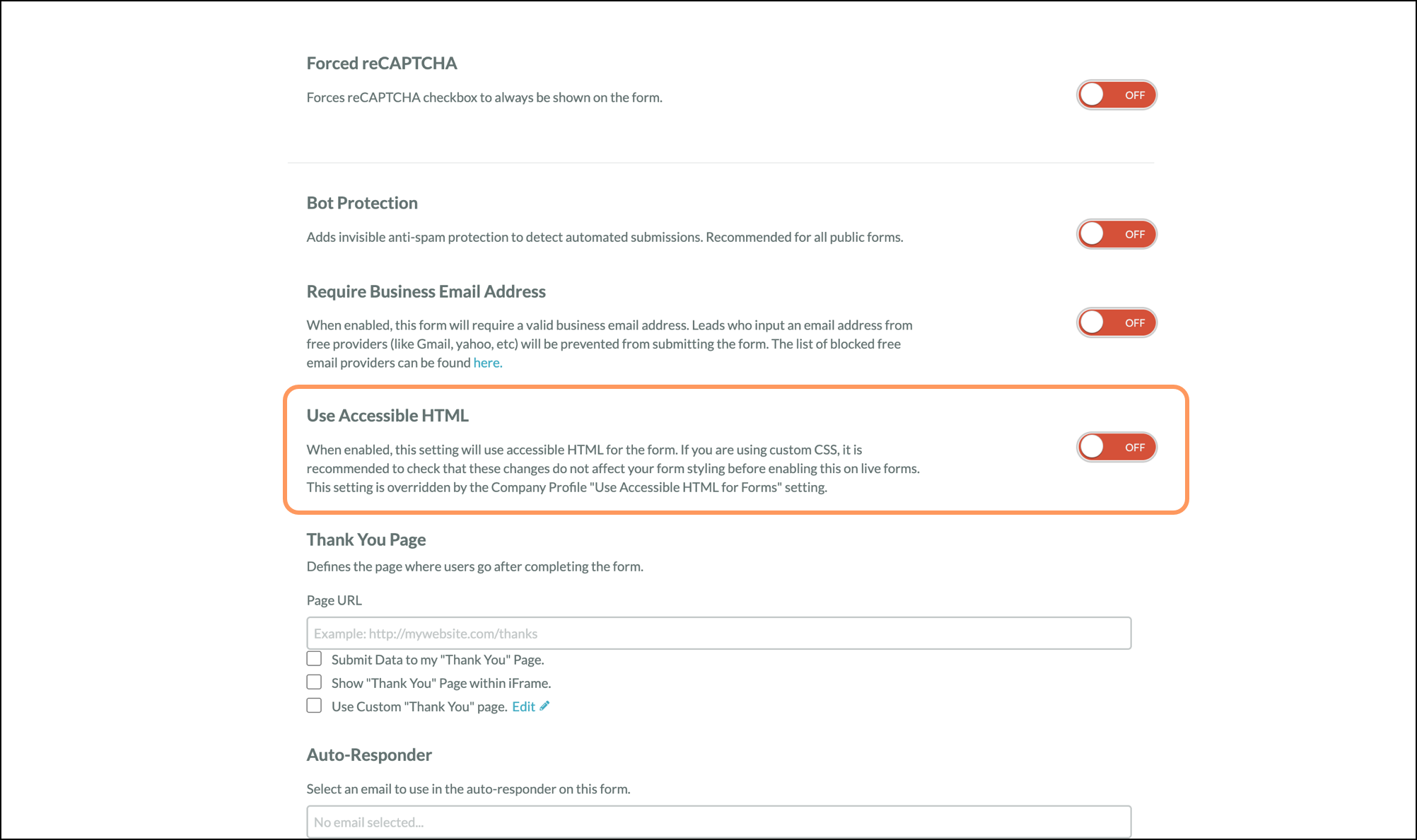
Account-level toggle
Access your account settings by clicking the Settings icon in the launchpad or in the bottom left corner of the page. Then click Company Profile and scroll down to locate the form toggle option. 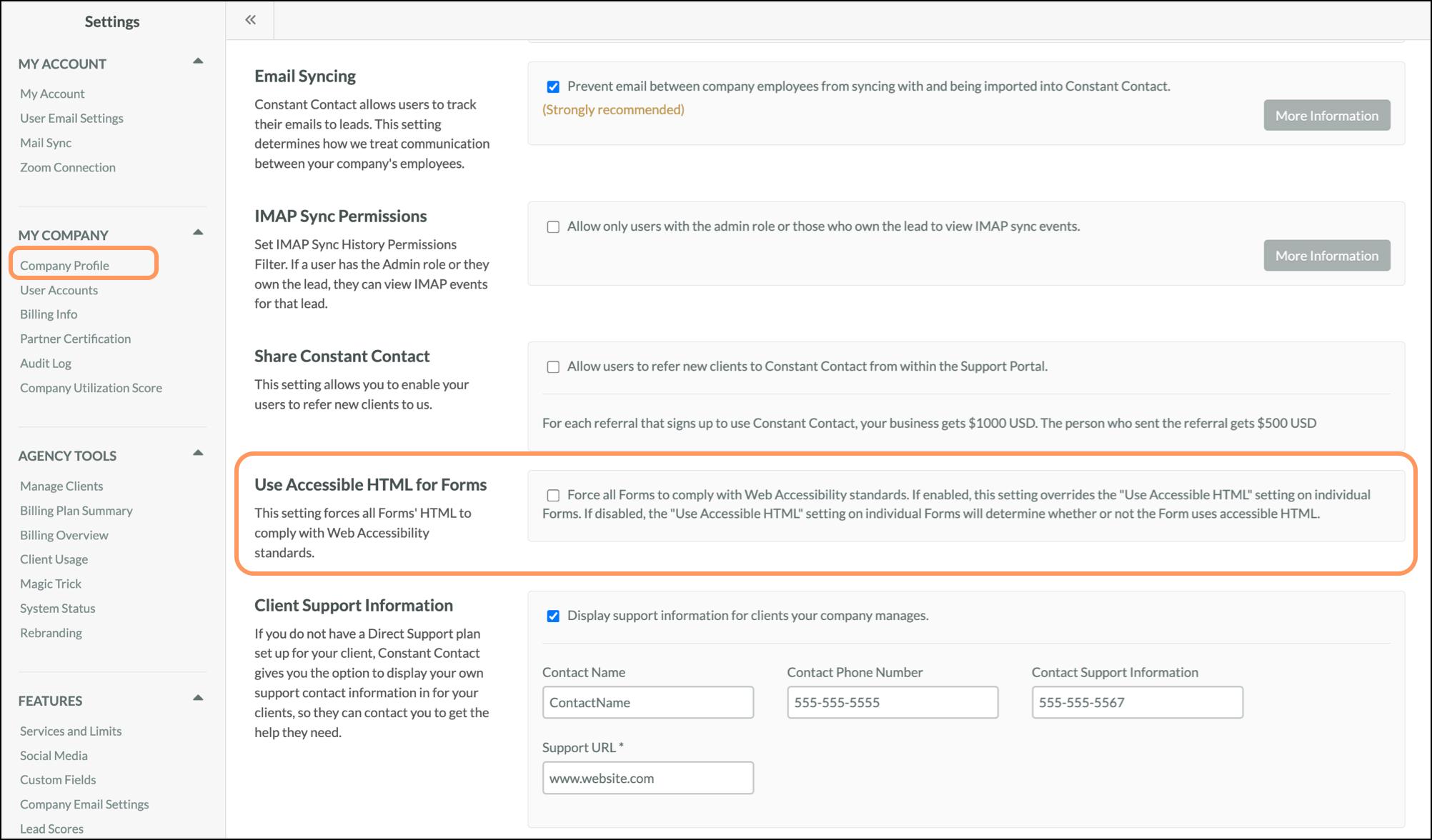
These changes are cumulative in their accessibility impact. Together, they ensure that Lead Gen & CRM Forms are:
There are three classes of changes that we have made to our forms: Accessibility & Screen Reader Enhancements; HTML Structure Changes; Form Field Label & Input Fixes; and Visual & Interaction Improvements.
Form embed <iframe> title attribute — A title attribute has been added to the Form embed <iframe> element. This defaults to the Form's name and can be customized directly in the Form's embed code. Screen readers use this attribute to identify the embedded Form.
<html> lang attribute — A lang attribute is now included on the Form's <html> tag, pulled from the Form's language settings. This helps screen readers apply the correct language and pronunciation rules.
<title> element — A <title> element has been added to the Form document. It defaults to the Form's name and is used by screen readers to identify the page.
<main> wrapper — The entire <form> HTML element is now wrapped in a <main> tag, designating the Form as the primary content section of its HTML document.
Form Rows element change — Form "Rows" has been updated from <div> elements to <li> (list item) elements.
<li> / <ul> nesting fix — An issue has been resolved where <li> list item elements were not direct children of their parent <ul> unordered list elements, as required by HTML standards.
Element Form Fields — Element-type Form Fields (e.g., Header, Horizontal Rule, Text) now have their HTML wrapped in an <li> list item element.
Upload Fields — Upload Field types now also have their HTML elements wrapped in an <li> list item element.
Error elements — Form validation errors now render using a <span> element instead of a <div>.
<label> for attribute alignment — All Form Field <label> elements now correctly reference their associated <input> elements via the for attribute, where applicable.
Radio, Checkbox, Boolean, and Bit fields — <legend> and <fieldset> — These field types now use a <legend> element to wrap their field labels, replacing the previous <label> element. This resolves an issue where individual checkbox and radio options could not correctly associate their <label> elements with their respective <input> elements. Additionally, the individual options within these field types are now wrapped in a <fieldset> element.
State Field id attribute — The State Form Field's id attribute has been updated to align with the standard id convention used by other Form Field types.
Radio and Checkbox Input Size options — Input Size options for Radio and Checkbox fields have been added to the Visual Form Styler.
Keyboard navigation for date pickers — The Date and Datetime picker fields are now fully keyboard navigable.
To test these changes on an existing form, you should duplicate the form, republish it, and embed the duplicated form on an unreachable test page along with your custom CSS.
If you are updating an existing form, please note that as soon as you publish any updates after July 6th, the changes will take effect everywhere the form is embedded. It is important that you test your form before publishing changes if you are using custom CSS.
Please note that Support is unable to provide assistance updating your website’s custom CSS. Please consult your website team for assistance updating custom CSS.
Copyright © 2026 · All Rights Reserved · Constant Contact · Privacy Center