For US Customers:
 | Important: Our SMS marketing tools are only available to US customers (excluding Puerto Rico and the US Virgin Islands) with a valid 9-digit Tax ID Number (TIN), or an Employer ID Number (EIN) for businesses assigned by the IRS. Sole proprietors who are the only employee do not need to enter Employer ID Number (EIN). Contacts with phone numbers from Puerto Rico can join your list and receive text messages. Learn more. |
For Australian Customers:
| Important: Our SMS marketing tools are only available to Australian customers with a valid 11-digit Tax ID Number (ABN). Learn more. |
Getting started with SMS marketing? Here's how to make your SMS messages stand out from the crowd, meet compliance standards, and effectively promote your organization:
 | Be a better marketer: Want to learn more about SMS marketing? Check out SMS Text Message Marketing Best Practices to Build Relationships and Increase Sales! |
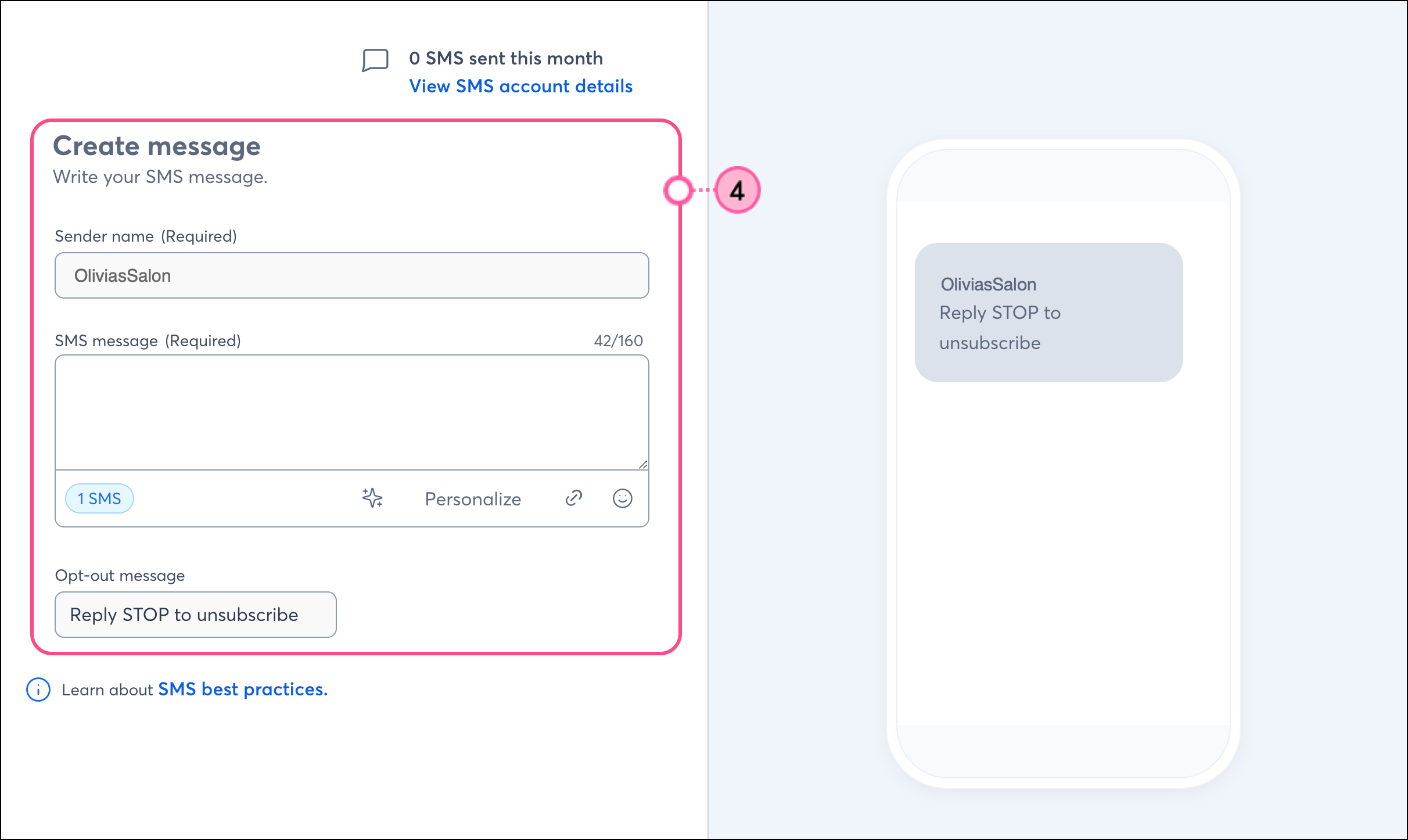
When filling out the "Sender information" section during the SMS registration process, we automatically pull in your "Organization name" from the "Organization details" section in My Account as the default sender name. This name appears in your outgoing text messages and can only be changed before completing registration.
Contacts who opt in to receive SMS messages are much more likely to read them if they immediately recognize who sent them. Make sure your Sender name is closely tied to the face of the organization your contacts are used to seeing, so there's no confusion when they receive your text messages. For example, use the same name that they see on your website or on the sign over your door.
Please note that:
To send SMS messages to your contacts, they must opt into SMS marketing. Phone numbers you have on file for your existing contacts are not automatically considered opted in. Once your SMS registration is approved, we automatically create an SMS-enabled Sign-up Landing Page for you, allowing you to begin collecting new SMS contacts and requesting permission from your existing contacts to send SMS messages.
S.H.A.F.T. and prohibited SMS content in the US, Australia, & Canada
Prohibited content topics are subject to stricter regulations, guidelines, and industry standards. Before drafting your content, check out the prohibited content section in our article: About Constant Contact’s SMS tool.
Please see the CTIA's Short Code Monitoring Handbook for more information about S.H.A.F.T. and prohibited content.
Telephone Consumer Protection Act (TCPA) in the US and the Spam Act 2003 in Australia
The TCPA and the Spam Act require businesses to get prior consent in order to send text messages to customers for marketing purposes. Collecting SMS contacts through an SMS-enabled Sign-up Landing Page, and inviting your existing contacts to opt into SMS through our specially designed email template are the best ways to ensure that all your SMS contacts provide express/explicit permission to receive SMS messages from you.
The TCPA also prohibits the sending of marketing messages during quiet hours. Quiet hours for SMS marketing messages are between 8:00 p.m. and 8:00 a.m. (local time). We prevent you from sending or scheduling SMS messages within this timeframe.
Please see Title 47, Chapter 5, Subchapter II, Part I, § 227 of the U.S. Code for more information about the TCPA.
Keep your content relevant and timely. Most recipients open SMS messages almost immediately, so your message should be timely, accurate, and relevant, and make sense for your particular campaign and organization.
Each SMS message has a 1950-character limit and is split into multiple text messages (or segments), each with a 160-character limit or a 70-character limit when an emoji is included. The individual text messages are recombined to appear as a single text message on your contacts' devices.
If possible, it's best to keep your messages short and concise as a 160-character message, since:
When creating SMS messages, be aware of the character limit to help you stay within your monthly message count. To maximize your space within the character limit, links are automatically shortened. To provide you with the most accurate statistics, each SMS message is limited to one link, even if it spans multiple segments. Please note that shortened URLs can result in higher bounce rates.
Avoid using variables in your links. For example, creating an SMS message that includes "Visit our website at www.mycompany.com/[[FIRSTNAME]]" will result in an error and prevent the SMS from being sent. Variables can still be used within your messages to personalize them. For example, sending "Welcome [[FIRSTNAME]], we're happy you're here!" is just fine.
When using automated customer journeys, messages for abandoned carts should include a clear call to action that states the message's purpose. By default, our 'abandoned cart' templates have all the text and links you need. If you decide to edit the template messages, be consistent with the call to action and ensure it does not detract from the message's purpose.
For more information, please refer to our guidelines on using SMS marketing for abandoned cart text message restrictions.
When you're upfront about how you use SMS in your marketing, it makes it easier for people to opt in and ensures those who do opt in genuinely want to be on your SMS list.
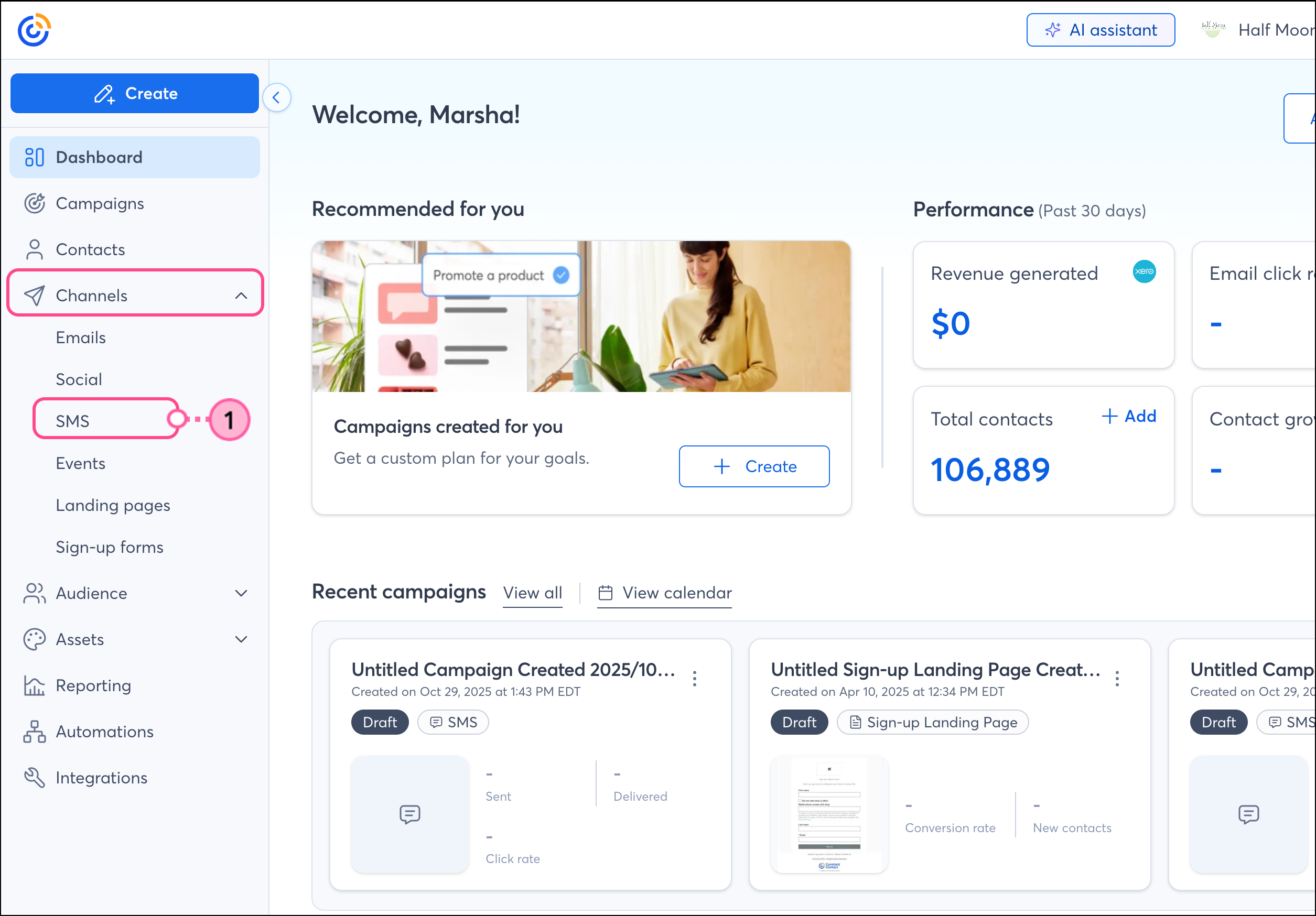
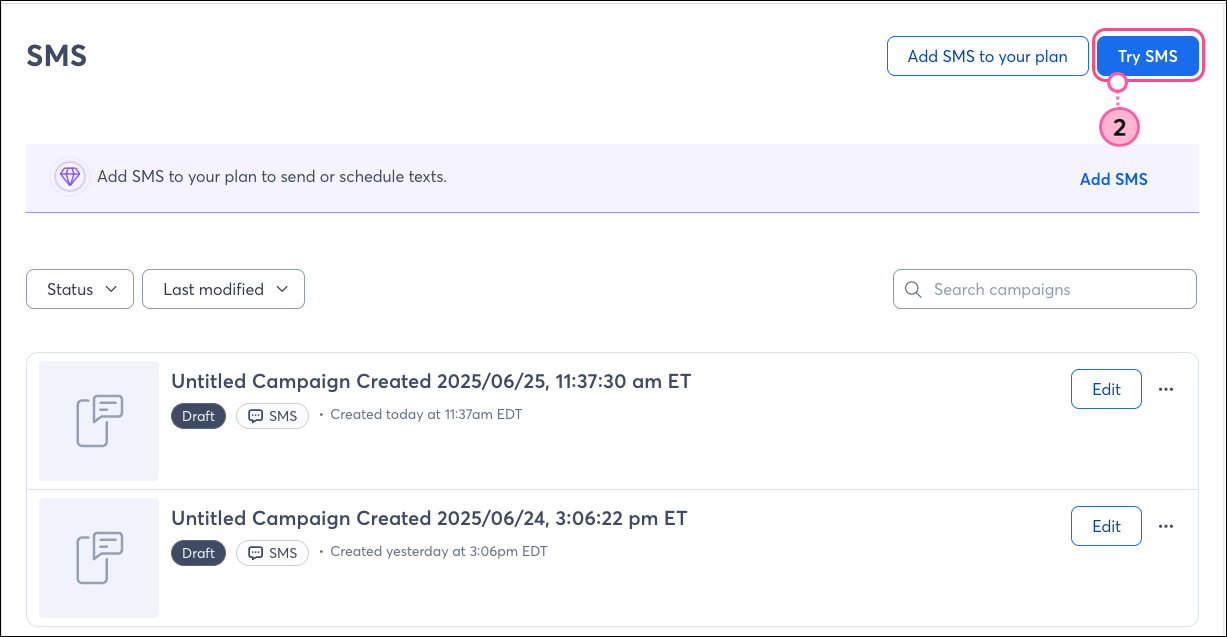
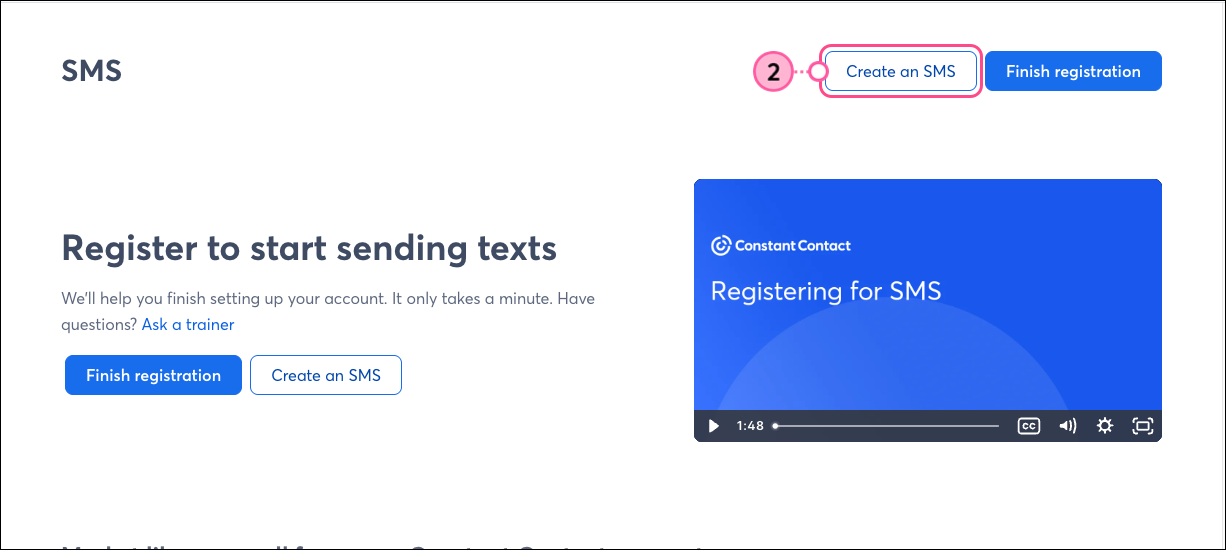
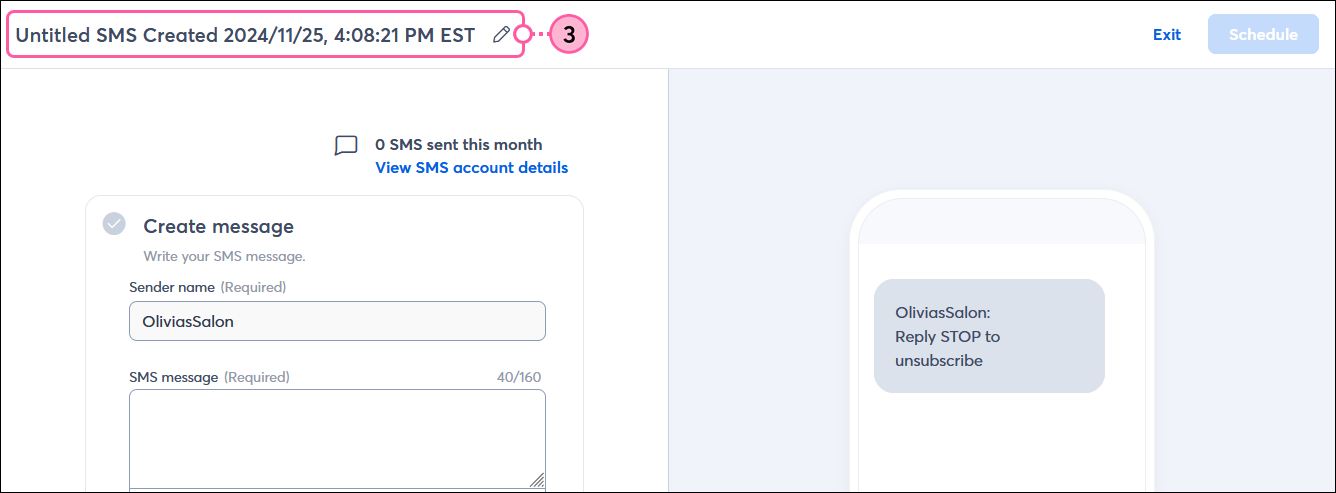
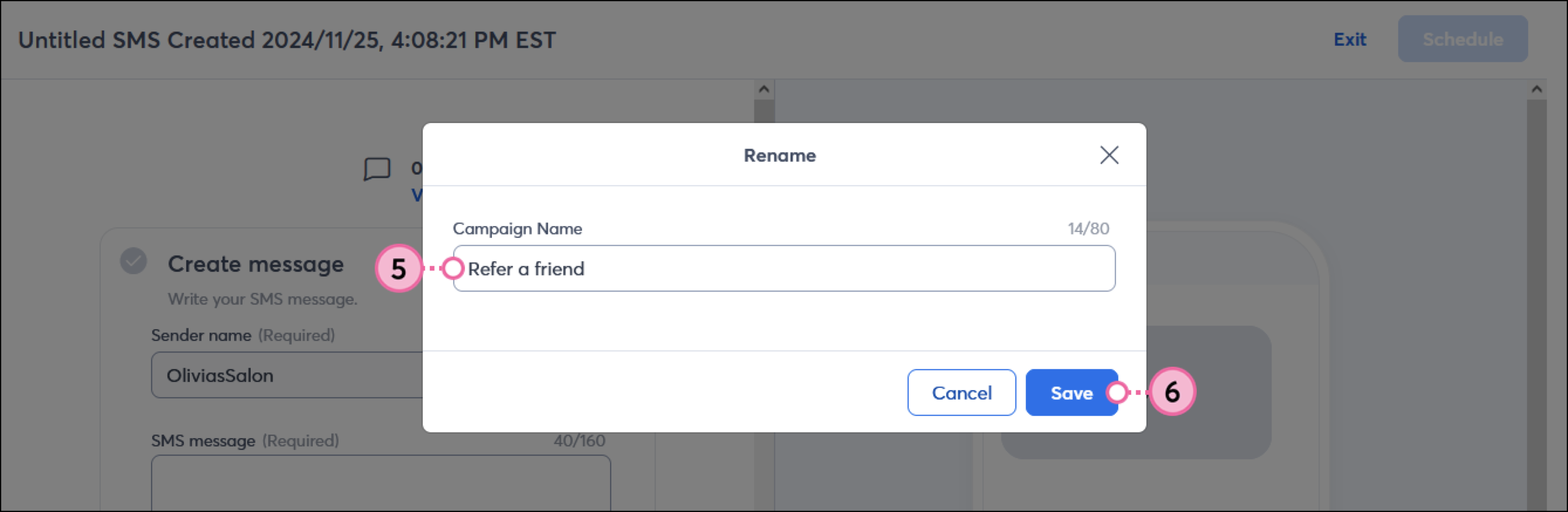
Even before you sign up, you can access the Campaign Editor and get started with SMS. Complete the following steps:
Any links we provide from non-Constant Contact sites or information about non-Constant Contact products or services are provided as a courtesy and should not be construed as an endorsement by Constant Contact.
Copyright © 2026 · All Rights Reserved · Constant Contact · Privacy Center