Email and Digital Marketing
How can we help you?
Search our help articles, video tutorials, and quickstart guides

You've got this. You've got us. Search our Knowledge Base to quickly find answers to your questions.

Cancel your Constant Contact Social account

Article: 000055183
Updated: February 27, 2026

If you have a Constant Contact Social account and would like to cancel, follow these instructions

Exclamation point iconImportant: This article pertains only to users who have purchased a Constant Contact Social account. This does not apply to Email & Digital Marketing or Lead Gen & CRM customers.


We understand that circumstances can change, and we're sorry to see you go. If you've decided that canceling is the best option for you, please take the following steps within your Constant Contact Social account:
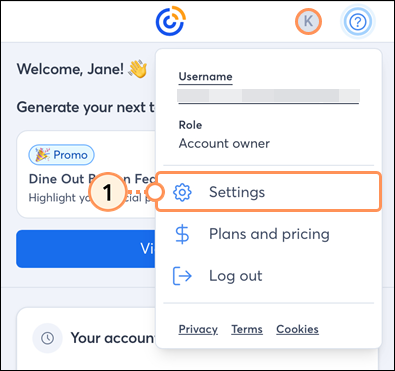
 

  1. Tap on your profile icon and then tap Settings from the dropdown.

    Account dropdown menu Settings option

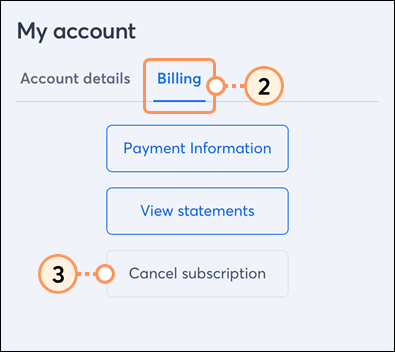
  2. Tap the Billing tab.
  3. Tap Cancel subscription.

    Billing tab cancel subscription button

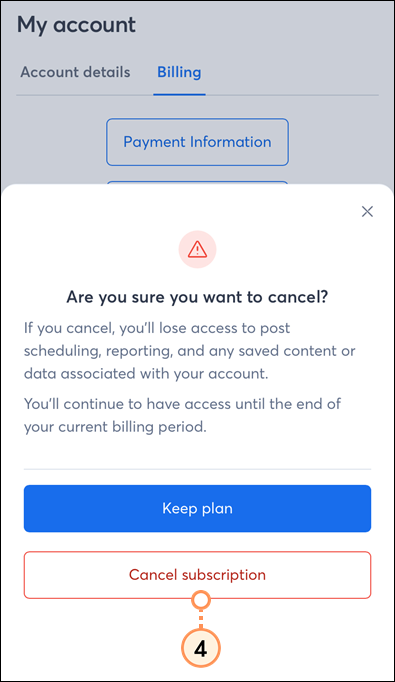
  4. Tap Cancel subscription to confirm.

    Cancel subscription button

When you cancel, you'll continue to have access until the end of your current billing period. Upon completion of the current billing period, you'll lose access to post scheduling, reporting, and any saved content or data associated with your account.


Questions?

Ask the Community

Did this article answer your question?


Constant Contact Logo

Copyright © 2026 · All Rights Reserved · Constant Contact · Privacy Center