Email and Digital Marketing
How can we help you?
Search our help articles, video tutorials, and quickstart guides

You've got this. You've got us. Search our Knowledge Base to quickly find answers to your questions.

Label an individual contact as having given implied or express permission

Article: 000033122
Updated: December 18, 2025

Manually label a contact as having given implied or express permission to send emails and satisfy spam and data privacy laws like CASL and the GDPR

Exclamation Point IconImportant: Before you can label a contact with express or implied permission, the Advanced Email Permissions must be enabled for your account. We always track the permission from our own sign-up tools, but it remains behind-the-scenes until you turn on the advanced permissions.


When your contacts give you verbal or written permission to email them, Constant Contact considers them to be active contacts that can be emailed. When it comes to collecting email addresses under the Canadian Anti-Spam Legislation (CASL) or the European Union's General Data Protection Regulation (GDPR), you also need to know which contacts have given you express/explicit or implied/implicit permission to email them. If you've been tracking permission on your own, you can manually update the contact record for each contact to reflect their permission status.

  1. Search for the contact you want to update.
  2. Place your cursor over the contact's name and click the Preview (eye icon) button.

    All contacts table with Search field and Email address option selected, and search results with Preview button visible

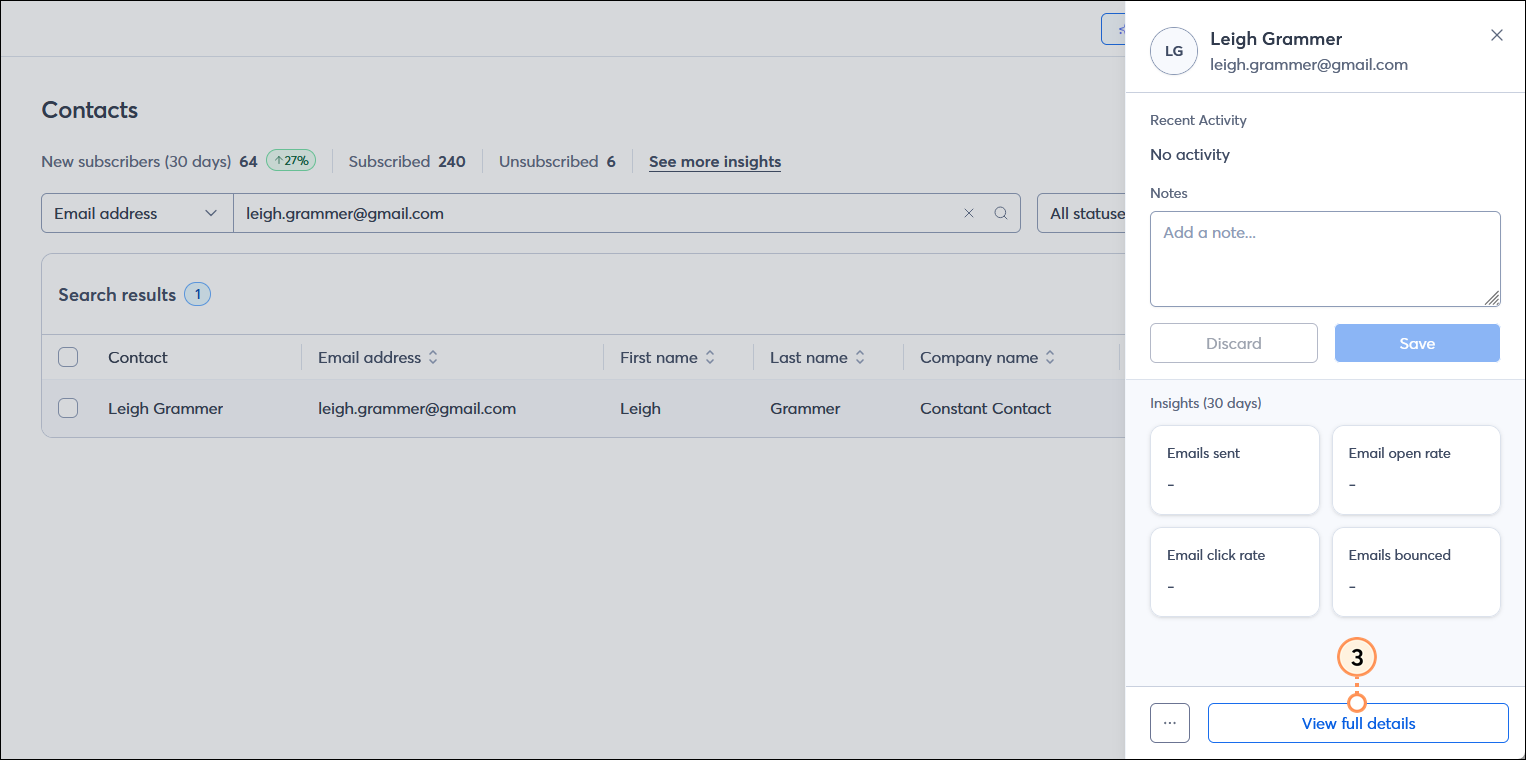
  3. From the panel on the right-hand side of the page, click the View full details button.

    Contact panel with View full details button

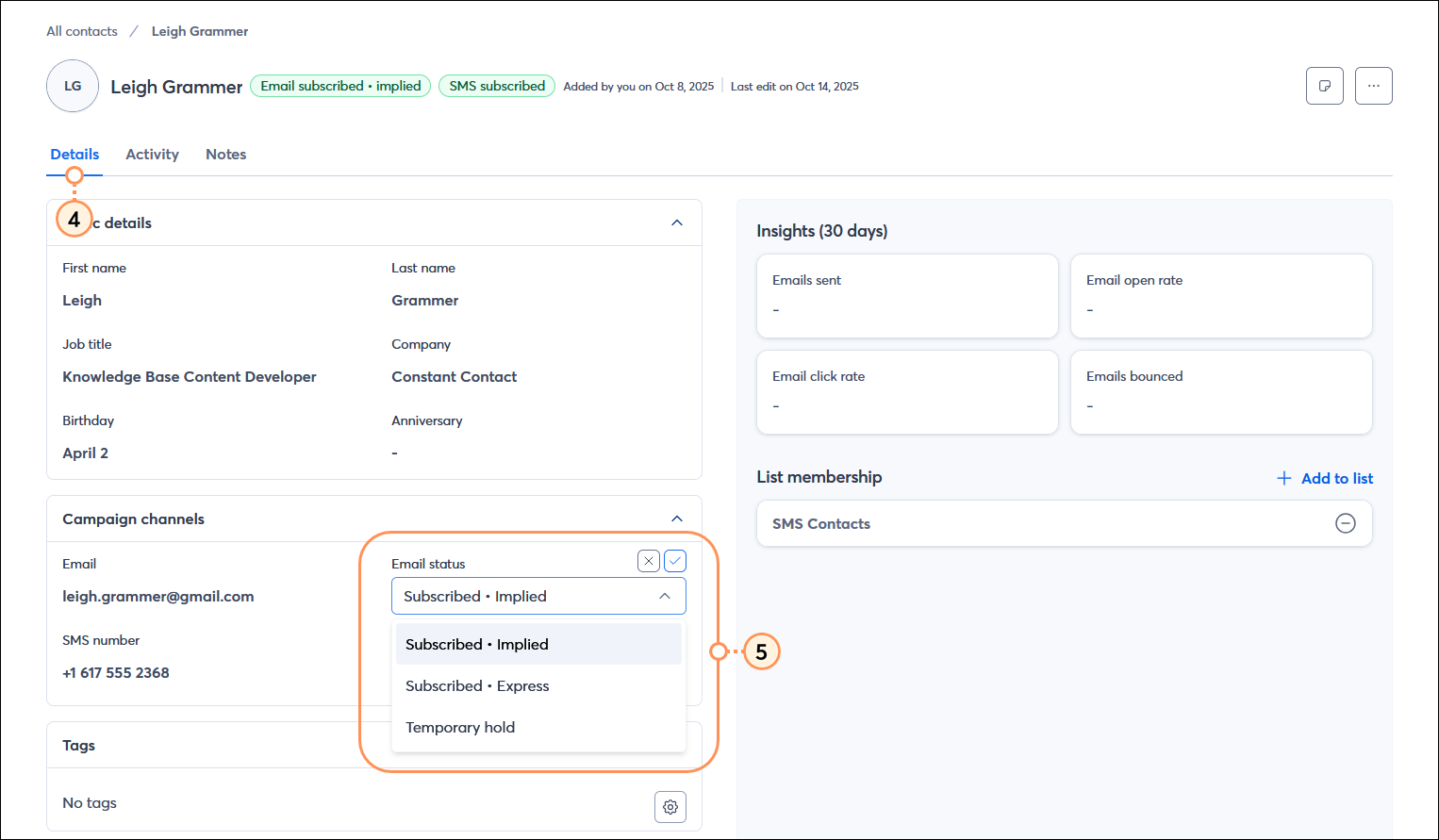
  4. In the contact record, click the Details tab.
  5. From the Campaign channels section, click anywhere on the Email status field and select an email status from the drop-down menu:
  • Subscribed - This is the default status when a contact joins your list or you add a contact to your account without the advanced email permissions being enabled.
  • Subscribed - Implied - You have some sort of transactional or business relationship with these contacts, and you can send them email based on that relationship, but they didn't give express permission to send them email for anything outside of that relationship. CASL and the GDPR have different definitions of what the relationships entail, and Implied permission expires under CASL.
  • Subscribed - Express - These contacts have given written consent to be emailed and have taken the step to opt-in. CASL and the GDPR have different requirements for what you need to provide to these contacts when they make the decision to join your contact list.
  • Temporary hold - A temporary hold prevents emails from being sent to a contact but doesn't unsubscribe the contact. If you have a contact that you believe may have been added to your list fraudulently or that you think might be fictitious, you can add the "temporary hold" status to them to prevent emails from being sent. If a contact is already labeled as "temporary hold" it is best to leave them that way to prevent unwanted emails or bounces.

    Contact record with Details tab selected, Campaign channels section expanded, and Email status field with drop-down-menu-expanded

As you add contacts to your account, using our sign-up forms ensure that you receive and document express consent from your contacts, which satisfies Constant Contact's email permission policy as well as GDPR and CASL regulations.


Blue Ribbon IconBe a better marketer: Learn more about the Canadian Anti-Spam Legislation (CASL) or the General Data Protection Regulation (GDPR).


Questions?

Ask the Community

Did this article answer your question?


Constant Contact Logo

Copyright © 2026 · All Rights Reserved · Constant Contact · Privacy Center