Email and Digital Marketing
How can we help you?
Search our help articles, video tutorials, and quickstart guides

You've got this. You've got us. Search our Knowledge Base to quickly find answers to your questions.

Disable email tracking for your Constant Contact account

Article: 000055284
Updated: September 8, 2026

Disable email tracking in your account to meet data privacy laws or electronic communication regulations by contacting our Support team

Depending on where your recipients are located, data protection laws and electronic communications regulations may require that consent for email engagement tracking (such as open pixels and click tracking) be gathered independently from standard email marketing consent. Some regulations also require that recipients have the ability to revoke their tracking consent at any time without needing to fully unsubscribe from your mailing list.

If you determine that you need to disable email tracking for your account, here's what you need to know:


Exclamation Point IconImportant: Customers are responsible for evaluating their legal obligations and determining whether these rules apply to their organization and email audience. (For details on specific regional regulations, see our guides on France’s CNIL Email Tracking Recommendation and Italy’s Garante Guidance on Tracking Pixels.)


How do I disable tracking for my account?

To disable email tracking for your account:


Exclamation Point IconImportant: When email tracking is disabled it is not retroactive and only affects emails sent after the tracking is disabled.


What happens to all the different features in my account that rely on tracking data?

When tracking is disabled, certain features will no longer work as intended:

  • Email tracking pixel - The email tracking pixel is removed from all emails to prevent opens tracking.
  • Reporting - We will continue to track sends, deliveries, unsubscribes, and spam reports, but email opens and link click information will be unavailable.
  • Resend to non openers - If you enable the "resend to non-openers" option when sending an email, the email resends to all contacts because we can no longer discern who did not open.
  • Segments - The engagement options in the Segment Builder are disabled because we can no longer use opens and clicks to determine engagement.
  • Dynamic links - Links with personalization will be broken.
  • Landing pages - If the link to a landing page is included within an email, the reporting will no longer show the clicks attributed to the email.
  • UTM link tracking - UTM parameters are no longer inserted onto a URL.
    Note: At this time, UTM tracking is automatically disabled behind-the-scenes and the toggle switch does not actually enable it if you click it into the "on" position from within your account settings.
  • Web tracking - Certain Web Tracking features, like attributing site visits to specific emails, will no longer work.


How can I tell if tracking is disabled?

To check the status of the "Email tracking" setting in your account settings:
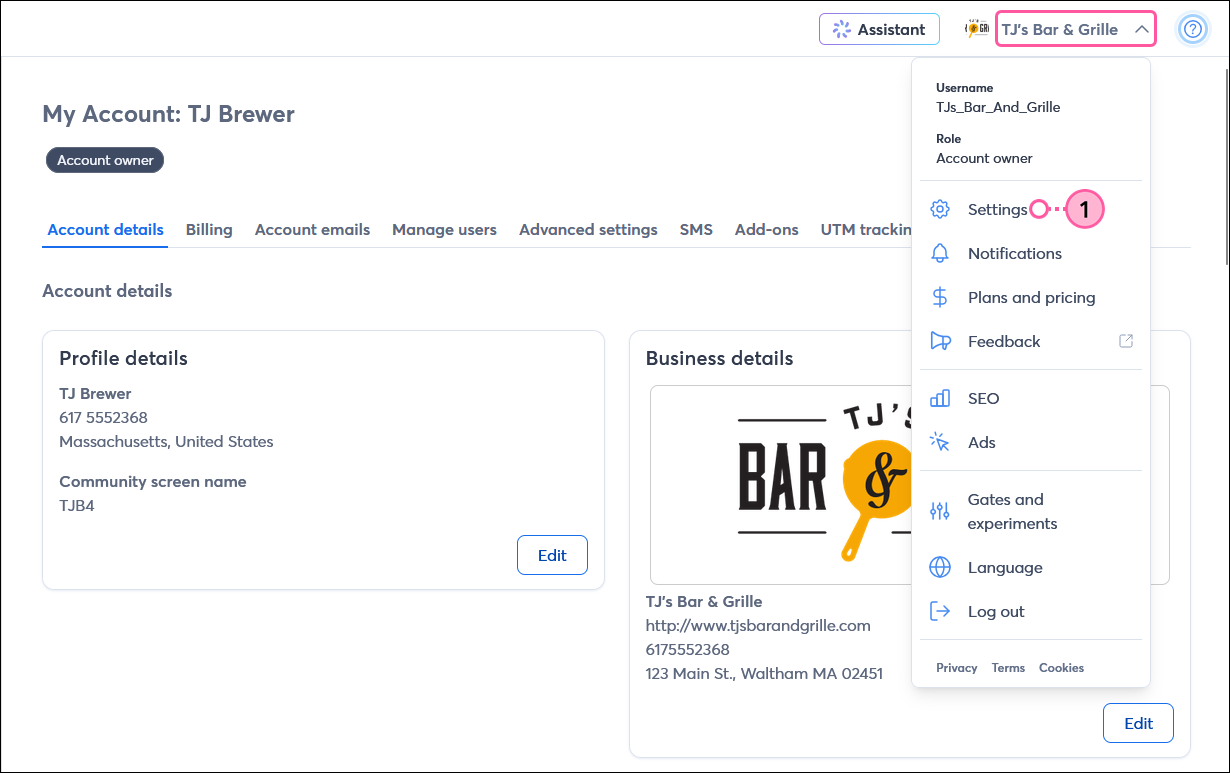
  1. Click on your user name in the upper right-hand corner, and select the "Settings" option from the drop-down menu.
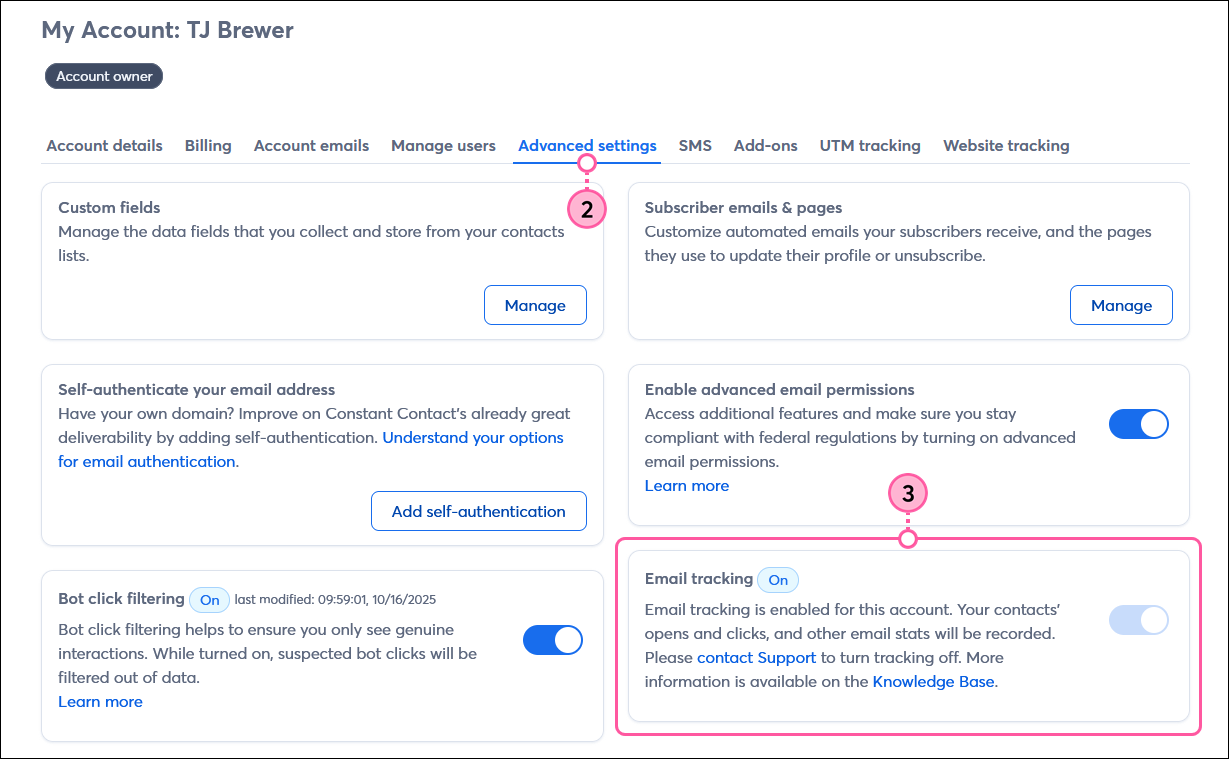
  2. Click the Advanced settings tab.

    Account settings page with Account details tab selected, and Accont owner drop-down menu displayed with Settings option selected

  3. View the Email tracking section. The indicator next to the heading tells you if the tracking is "On" or "Off." The toggle switch is always disabled, and if you want to change the setting, you must contact our Support Team.

    Account settings page with Advanced settings tab selected, and Email tracking section with feature enabled and toggle switch disabled


Any links we provide from non-Constant Contact sites or information about non-Constant Contact products or services are provided as a courtesy and should not be construed as an endorsement by Constant Contact.


Questions?

Ask the Community

Did this article answer your question?


Constant Contact Logo

Copyright © 2026 · All Rights Reserved · Constant Contact · Privacy Center