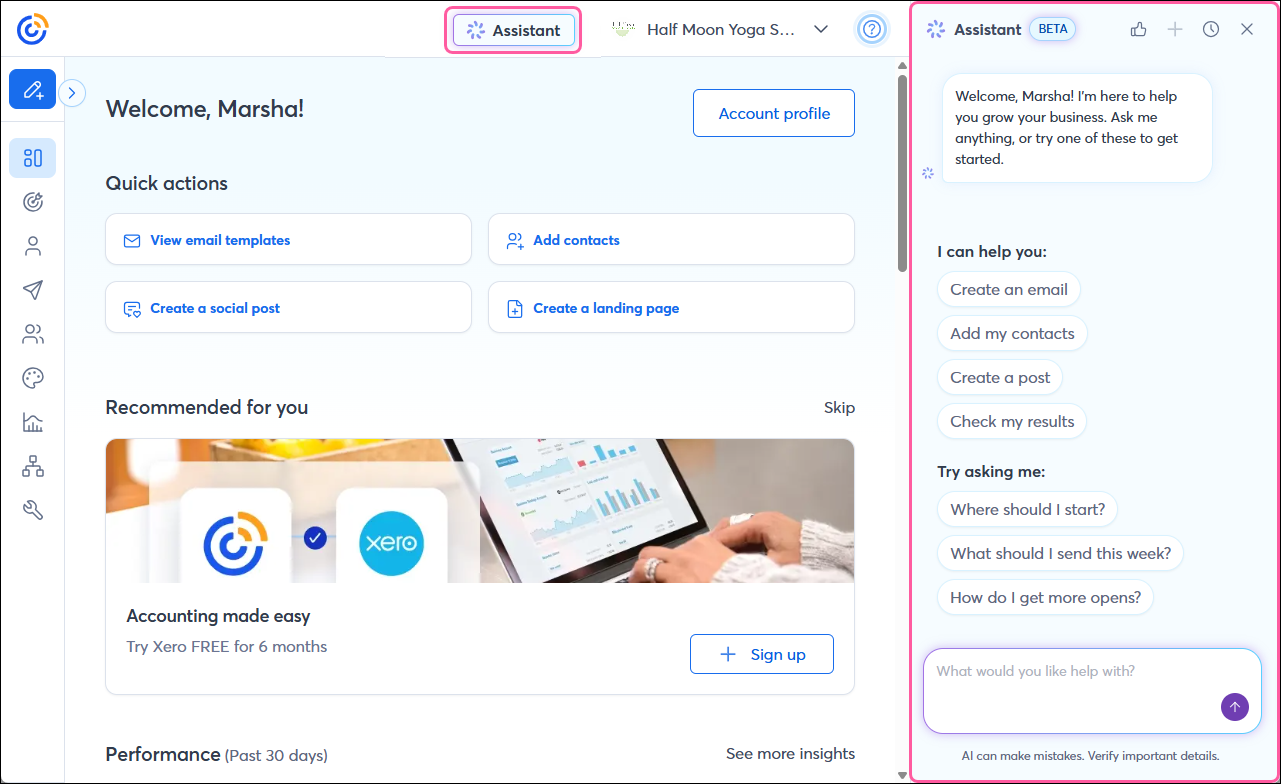
Our new Assistant is designed to help you with various tasks within your Constant Contact account, including setting up your brand, managing your contacts, and creating campaigns. It also leverages GPT-driven insights and user-specific data to provide personalized marketing strategies and tailored guidance, helping you succeed.
How is the Assistant different from a chatbot?
The main difference between the Assistant and a typical chatbot is that the Assistant serves as a more knowledgeable, personalized helper rather than responding with preset answers. It adapts to situations, learns from interactions, and can take proactive actions or decisions.
What can the Assistant do?
We’re continuing to expand the Assistant’s capabilities. Currently, it can:
- Set up a brand profile and provide colors based on your website
- Brainstorm ideas and strategize your marketing campaigns
- Try asking: "Help me come up with some email ideas"
- Generate email, social post, and SMS content for you
- Help you create, edit, and send a full email
- Try asking:
- "I would like to create an email about [an upcoming open house]"
- “Change the tone to be more friendly"
- "Do you have any suggestions on which list to send this email to?"
- "Schedule this email to go out [tomorrow at 5pm EST]"
- Create and schedule a social post for you
- Try asking:
- "Can you create a social post to promote our [upcoming sale]?"
- "Create a social post for Facebook and LinkedIn promoting my [upcoming open house on Saturday at 123 Main St in Waltham]"
- "Schedule this social post for [noon tomorrow]"
- Create and activate an automation path for your
- Try asking:
- "Can you help me set up a welcome automation?"
- "Change the trigger to send the automation when contacts join my [New Customers] list"
- Create and activate an event for you
- Try asking:
- "I want to create an event for our upcoming [yoga on the green] on [Saturday] at [the town center]"
- "Can you activate this event and suggest some ways for me to promote it?"
- Create a Sign-up Landing Page or a Link-in-bio landing page
- Try asking:
- "Create a Sign-up Landing Page for me to collect new contact email addresses"
- "Create a link-in-bio landing page with buttons for my [website, Facebook page, and blog]"
- Let you know how your past campaigns performed
- Try asking:
- "How have my recent campaigns been performing?"
- "Why did my last campaign have fewer opens?"
- "How much revenue did my campaigns generate?"
- Help you add individual contacts (Note: It can't upload a file of contacts at this time), create lists, and review and manage your contacts to keep your list organized
- Try asking:
- Can you add this contact [email address] to my [list name] list?
- Create a new list for me and name it [my VIP customers]
- Navigate you to the appropriate page within your account
- Answer questions about Constant Contact features and provide links to helpful Knowledge Base articles with additional information
 | Need some inspiration? Check out how others are using the Assistant in the AI Prompt Exchange on the Constant Contact Community, and share your experiences, too! |
Please note: Since this feature is still in beta, it’s not yet perfect—you may encounter flaws, and features may change from day to day as we experiment and add functionality.
How to submit feedback
Your feedback is crucial as we continue to develop and enhance our Assistant. Feel free to share your experience on the Constant Contact Community and provide any input that can be used to help you and future customers.