Google, Yahoo, and Microsoft have implemented new email authentication requirements for all email senders to improve deliverability and prevent spam. These changes were made in a continuing effort to protect their users against fraudulent messages, such as scams and phishing attempts, and will prevent any emails sent from unauthenticated email addresses from reaching the recipient’s inbox.
 | Learn more: For more information, check out our blogs on the latest requirements from Google, Yahoo, and Microsoft. |
Rest assured, Constant Contact is here to make sure your emails land in your contacts' inboxes and meet the latest email authentication requirements, regardless of how technical you are. Take a look at the different email authentication options available to you based on what you’re using as your "From" email address:
These email authentication requirements impact all bulk email senders, regardless of industry, business type, or location. It’s not limited to just Constant Contact customers.
With these requirements, Google, Yahoo, Microsoft, and many other receiving mailbox providers will treat unauthenticated email suspiciously. But don’t worry! At Constant Contact, we believe that no email should leave our system unless it meets the authentication requirements. If you don't have your own domain to authenticate with, or just haven’t self-authenticated yet, we'll rewrite your “From” email address to a shared domain that we can authenticate for you to help keep your emails from landing in the junk folder.
If you've successfully self-authenticated your domain, you’ll see it marked as "Authenticated" on the Account emails tab in your account settings.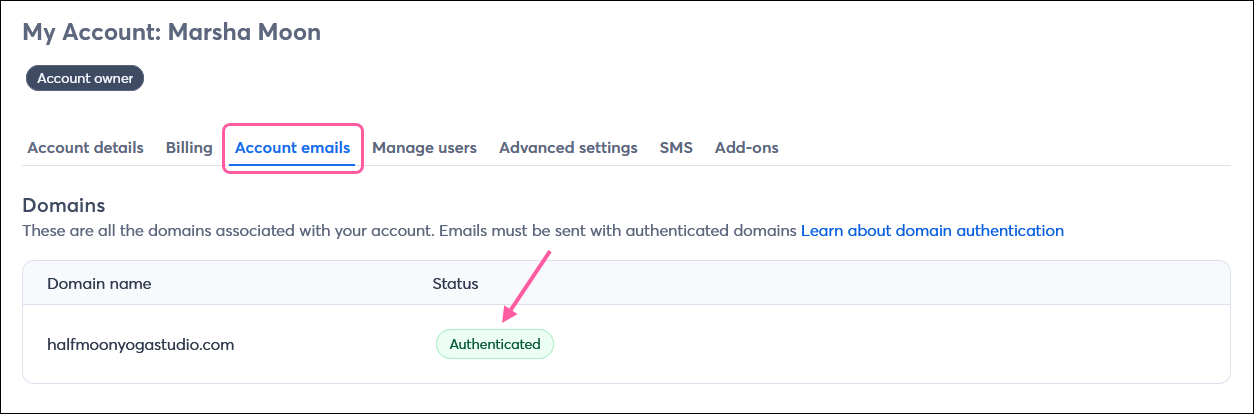
Keep calm and email on. If you don’t take action, we automatically rewrite your “From” email address with our shared ccsend.com domain, which meets the email authentication requirements. For example: <carlscoffee@gmail.com> will become <carlscoffee-gmail.com@shared1.ccsend.com>. That being said, setting up self-authentication and sending from your own domain is an industry best practice and helps build your brand’s sending reputation.
No, there's no cost to set up self-authentication within Constant Contact. However, keep in mind that any services performed outside of your account with a professional or domain provider could incur a fee.
Constant Contact doesn't offer domain hosting services, but you can purchase a custom domain from web hosting sites like bluehost.com or hostgator.com, or from domain hosting sites like domain.com or bigrock.com.
If you want to send from your own domain, you’ll need to set up self-authentication within Constant Contact and make sure you add the DKIM and DMARC records to your DNS settings.
No matter what domain you send your emails from—whether it’s your own domain that you self-authenticate or our shared ccsend.com domain—authentication is required for Google, Yahoo, and Microsoft to deliver your email to their users’ inboxes.
Yes, you'll need to set up self-authentication using a TXT record and add the record to your DNS settings for each Constant Contact account. You can’t self-authenticate using CNAME records if the same domain is used in multiple accounts.
At this time, you can only authenticate one domain in an account to use for your “From” addresses. If you need to email from multiple entities, we recommend setting up a separate Constant Contact account for each to avoid issues with unsubscribes, since your email footer defaults to a single entity.
While these requirements are primarily being publicized by Google, Yahoo, and Microsoft, we’ve seen an increasing number of ISPs and mailbox providers imposing stronger authentication requirements on inbound mail. We expect that all email clients will soon enforce these stronger requirements.
This should not affect your contacts, aside from helping to prevent them from receiving spam. If your “From” email address will be rewritten with our shared ccsend.com domain, you may want to give your contacts a heads-up so they know your emails will be coming from a different address.
Your “Reply-to” email addresses are not impacted, and you will continue to receive replies from your contacts.
Note: In some cases, if a contact has an auto-reply/vacation message set, it's sent to your "From" email address instead of your "Reply-to" email address. Unfortunately, Constant Contact can't control where these auto-reply messages are sent, as it's entirely dependent on the recipient's email provider. If you want to ensure you receive these auto-replies, use an authenticated custom domain for your "From" address instead of a freemail or unauthenticated domain, which gets rewritten upon send with our ccsend.com domain and are not tied to an actual email inbox.
No, there’s nothing different you need to do when sending your emails. The only change will be that you'll only be able to send from email addresses at your authenticated domain, whether that’s your custom domain or your customized subdomain with our ccsend.com domain.
Our research has shown that properly authenticated email tends to get better open and click rates.
There's nothing you need to do to set up easy unsubscribe for the latest requirements. Constant Contact already adds the correct header for this requirement, and once your email is properly authenticated, Google, Yahoo, and Microsoft will display an “unsubscribe” link at the top of the messages for their users.
These terms are used interchangeably, but essentially, a DMARC record is the information you need to add to your DNS records to implement a DMARC policy for your domain. A DMARC policy is the statement you make in your DMARC record telling receivers what to do with email that fails a DMARC check. For more information, take a look at this article explaining what a DMARC policy is.
Copyright © 2026 · All Rights Reserved · Constant Contact · Privacy Center