Email and Digital Marketing
How can we help you?
Search our help articles, video tutorials, and quickstart guides

You've got this. You've got us. Search our Knowledge Base to quickly find answers to your questions.

Resend the order confirmation email for an event

Article: 000049715
Updated: September 2, 2025

Manually send another order confirmation email to yourself or to an event registrant who cannot locate the original

When a person orders tickets for your event, they're sent an order confirmation email that contains a link to their tickets. In the event that they accidentally delete this email or can't locate it in their inbox, you can resend it to the registrant. You also have the option to get notified when someone registers for your event, and you can manually resend the notification to yourself if needed.
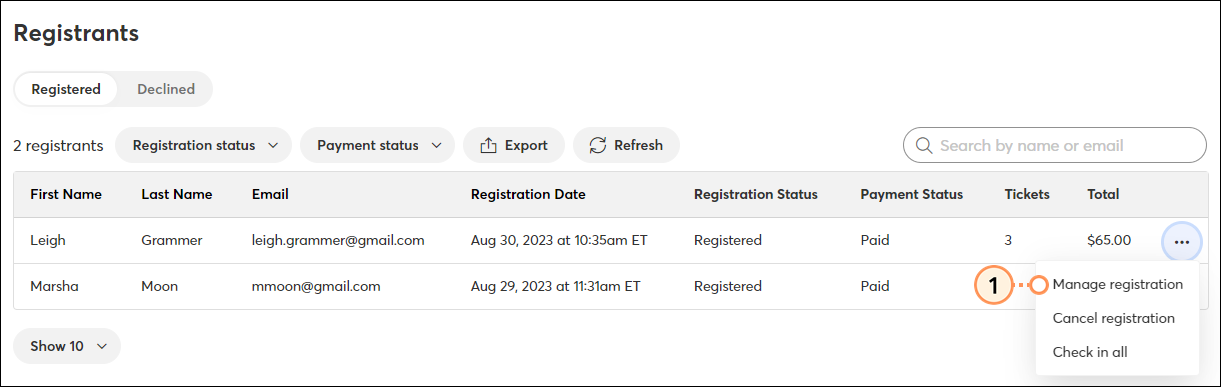
 

  1. Within the event dashboard, scroll to the Registrants section under the Reporting tab. Click the three dots on the right and click Manage registration.

    Manage Registration
     
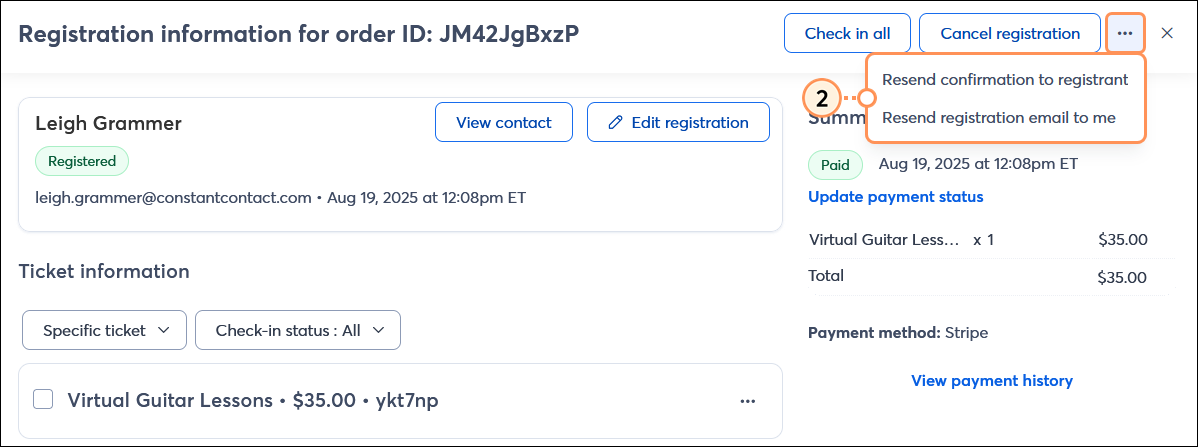
  2. In the upper-right corner, click the three dots and then click Resend confirmation to registrant or Resend registration email to me.

    Resend order confirmation options
     

A notification will appear to let you know that the confirmation email was successfully resent.


Questions?

Ask the Community

Did this article answer your question?


Constant Contact Logo

Copyright © 2026 · All Rights Reserved · Constant Contact · Privacy Center