When creating an email in our Custom Code editor, we automatically check your HTML for potential issues that could prevent your email from sending or from displaying the way you intend. While some of these issues are minor and you can still send your email without resolving them, others will prevent you from sending until they’re fixed.
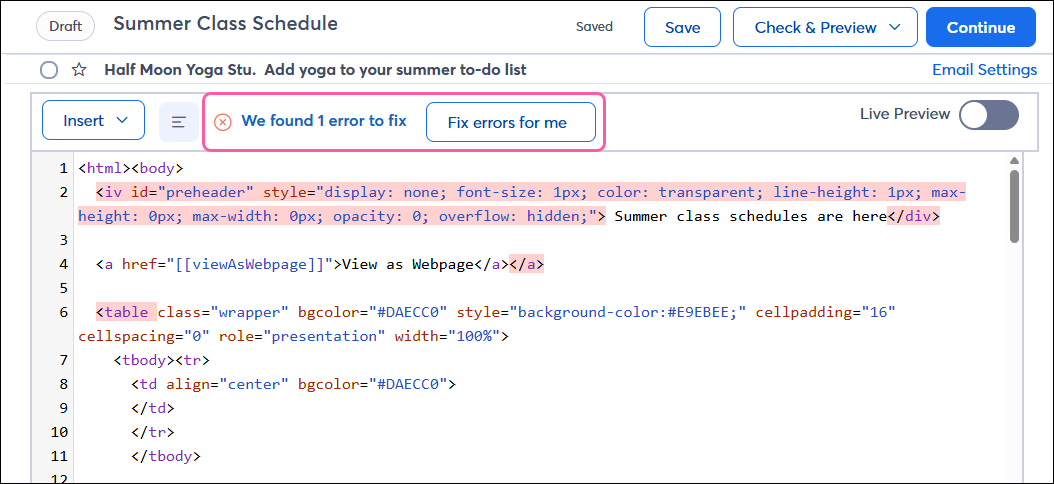
Certain errors found in your HTML require you to fix them before you can send your email. You can have us fix them for you, but you should preview your email before sending to make sure everything displays as intended. These issues will appear at the top of the email with a red X icon  .
.
If your HTML includes a tag or parameter that is not valid (for example, if you have a typo in the tag name) or a tag that we don't allow either for security reasons or because most email clients don't support it, you’ll receive an error that it’s not a supported tag. You’ll need to either fix the tag or delete it from the code before you can send the email. If you’re trying to include personalized contact details in your email, use this list of personalization tags.
The maximum email size is 400 KB. If your email is larger than that, you’ll need to remove some content before you can send the email. Keeping your email short also helps to increase engagement with your contacts.
For security reasons, we don’t allow the following combinations of characters:
If any of these are found in your HTML, you’ll need to remove them from the code.
Some issues found aren’t a huge deal, and you can send your email without fixing them, but we recommend you review them before continuing. These issues will appear at the top of the email with a blue information icon  .
.
If you have an invalid attribute in your HTML (for example, if there’s a typo in the attribute name) or you have proprietary attributes from programs like DreamWeaver, you’ll receive a warning that it’s not a supported attribute. You can choose to fix or delete it from the code; otherwise, it’ll be stripped out of the email when it’s sent. We recommend sending a test email to make sure it displays properly.
Some issues in your code will also result in a warning, such as missing closing brackets or quotes. To ensure your email displays the way you intend, all tags should be escaped (< >) and paired with an opening/start or closing/end tag. If any of these issues are found, they’ll be stripped out of the email when it’s sent.
| Tag | Description |
|---|---|
| <!DOCTYPE> | Document type |
| <a> | Defines a hyperlink |
| <abbr> | Abbreviation |
| <acronym> | Acronym |
| <address> | Contact info for document owner |
| <audio> | Embedded sound |
| <b> | Bold text |
| <big> | Big text |
| <blockquote> | Quote from another source |
| <body> | Document body |
| <br> | Line break |
| <center> | Center text |
| <cite> | Title of work |
| <code> | Defines computer code |
| <colgroup> | Column group |
| <dd> | Description of a term in a description list |
| <del> | Deleted text |
| <dfn> | Term defined within content |
| <div> | Document section |
| <dl> | Description list |
| <dt> | Term in a description list |
| <em> | Emphasized text |
| <h1> | Document header 1 |
| <h2> | Document header 2 |
| <h3> | Document header 3 |
| <h4> | Document header 4 |
| <h5> | Document header 5 |
| <h6> | Document header 6 |
| <head> | Contains document metadata |
| <hr> | Horizontal rule |
| <html> | Defines the root of the HTML document |
| <i> | Italicized text |
| <id> | Unique ID for an HTML element |
| <img> | Image |
| <ins> | Text inserted into document |
| <kbd> | Keyboard input |
| <li> | List item |
| <link> | External link |
| <marquee> | Scrolling text |
| <meta> | Defines document metadata |
| <ol> | Ordered list |
| <p> | Paragraph |
| <pre> | Preformatted text |
| <samp> | Sample computer program output |
| <small> | Small text |
| <span> | Defines a section |
| <strong> | Bold text |
| <style> | Defines style information |
| <sub> | Subscript text |
| <sup> | Superscript text |
| <table> | Table |
| <tbody> | Table body content |
| <td> | Table cell |
| <tfoot> | Table footer |
| <thead> | Table header |
| <title> | Document title |
| <th> | Table header cell |
| <tr> | Table row |
| <tt> | Teletype text |
| <u> | Underlined text |
| <ul> | Unordered list |
| <var> | Variable |
| <video> | Embedded video |
Copyright © 2026 · All Rights Reserved · Constant Contact · Privacy Center