If your contacts are telling you that they're not receiving your email, a good place to start is to have them check their spam or junk folder. If they see your email there, then ask them to safelist your email address. Safelisting an email address ensures that emails sent from that specific address reach the Inbox, instead of being marked as spam. In some cases your contacts only have to update the safelist in their email service, but sometimes they also have to update the safelist in their security program.
Each email provider or security service has their own instructions for adding email addresses to a safelist.
 | Did you know? If your "From Email" address is from a free email service, like AOL, Gmail, Outlook, or Yahoo, it can cause bounces or blocks based on an email client's DMARC policies. Consider upgrading your email address to a domain-based address to help prevent deliverability issues. |
In AOL Webmail, your contact list is your safelist. To add the "From Address" to your AOL contacts:
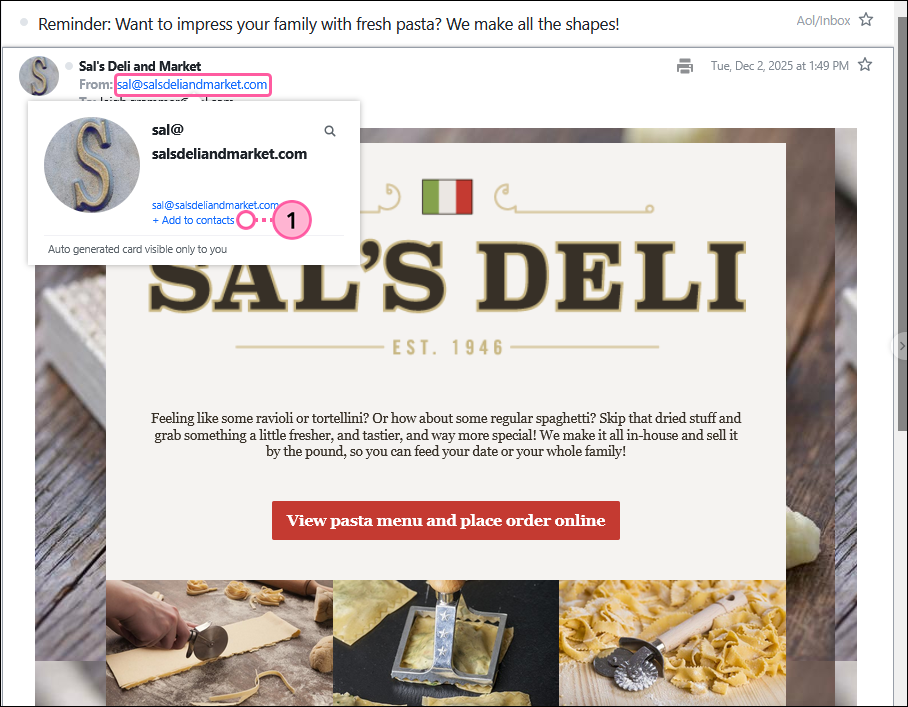
For additional help with safelisting email addresses in AOL, please see AOL's support.
For additional help with safelisting email addresses or making a sender email a VIP in Apple Mail or iCloud Mail, please see Apple's Support.
For additional help with safelisting email addresses in AT&T, please see AT&T's support.
For additional help with safelisting email addresses in Comcast SmartZone, please see Xfinity's support.
Cox.net users now use Yahoo Mail. For additional information, please see Cox's support.
For additional help with safelisting email addresses in Earthlink emails, please see Earthlink's support.
In Gmail, your contact list is your safelist. To add the "From Address" to your Gmail contacts:
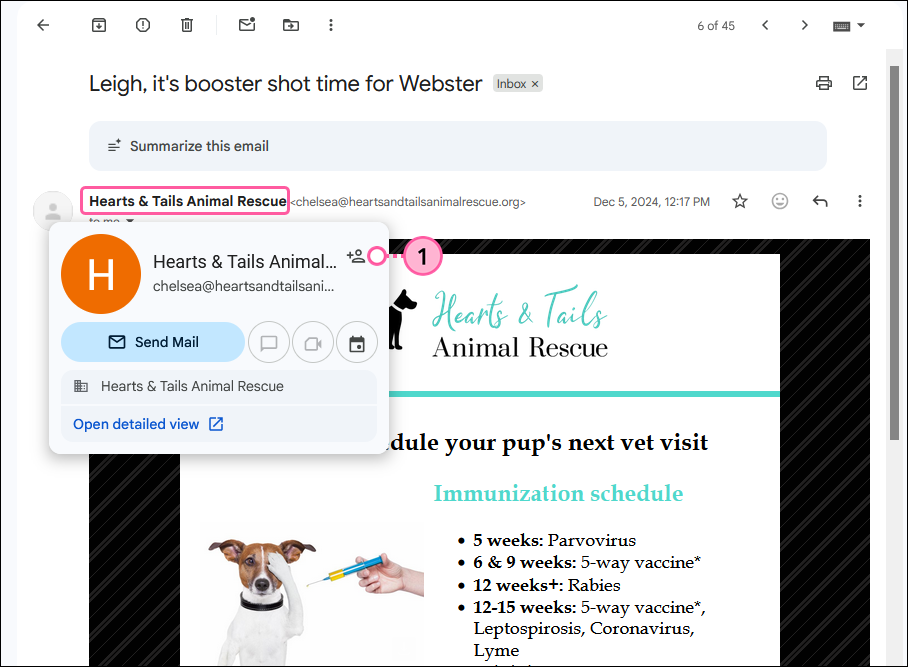
For additional help with safelisting email addresses or controlling who's saved as a contact in Gmail, please see Gmail's support.
For additional help with safelisting email addresses in GoDaddy, please see GoDaddy's support.
For additional help with safelisting email addresses in Kinetic/Windstream, please see Kinetic's support.
For additional help with safelisting email addresses in Thunderbird, please see Mozilla's support.
In Outlook, your contacts list is your safelist. To add the "From Address" to your Outlook contacts:
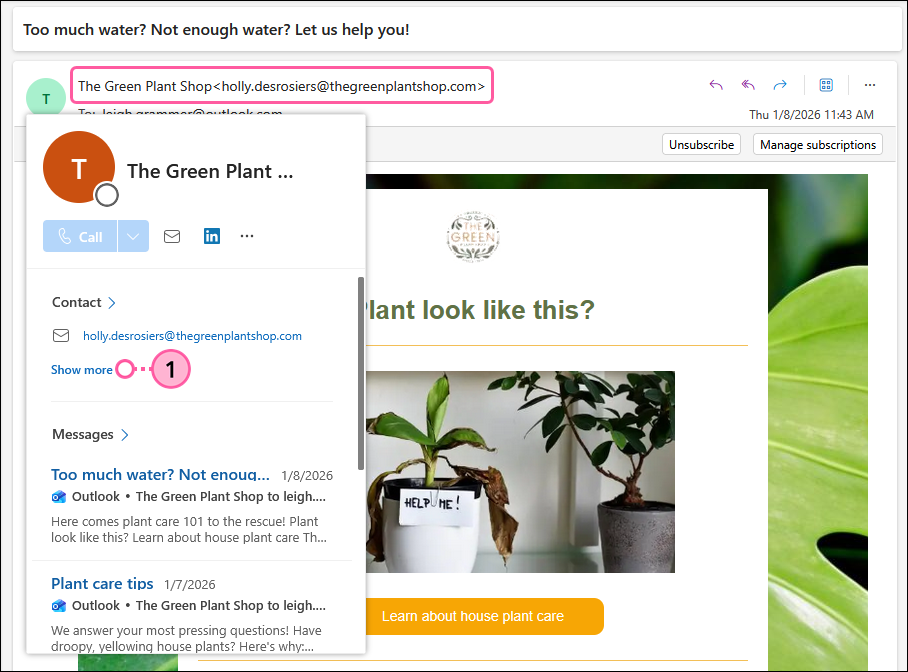
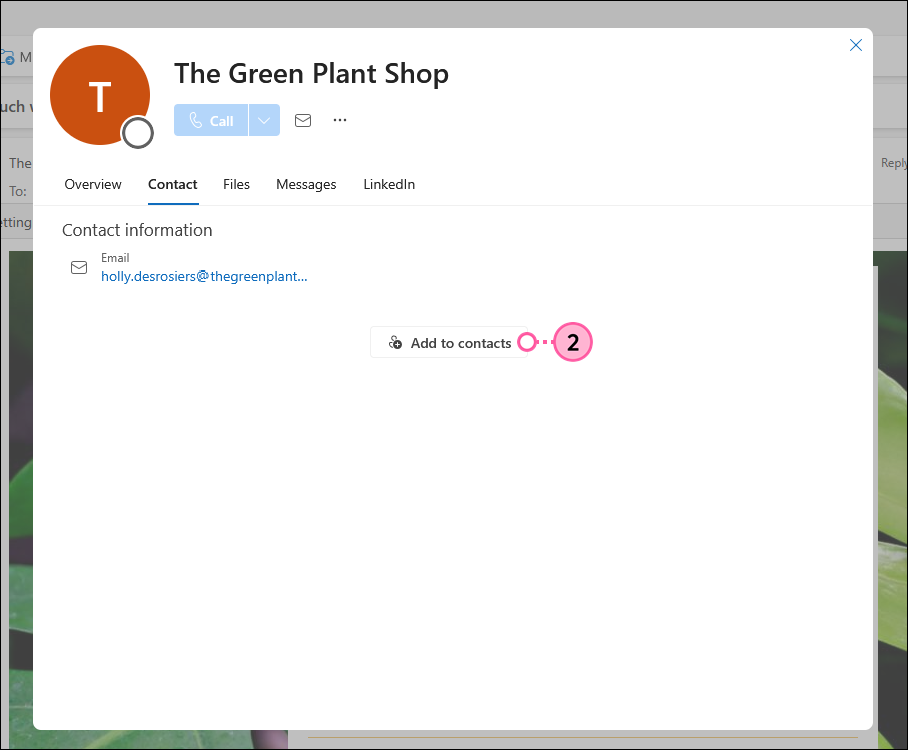
For additional help with safelisting email addresses in different versions of Outlook, please see Microsoft's support.
Adding an email address to the safe sender list will add the email to your inbox and future emails will be delivered to the inbox.
For additional help with safelisting email addresses in RoadRunner, please see Road Runner's support.
For additional help with safelisting email addresses in Verizon, please see Verizon's support.
In Yahoo Mail, your contact list is your safelist. To add the "From Address" to your Yahoo contacts:
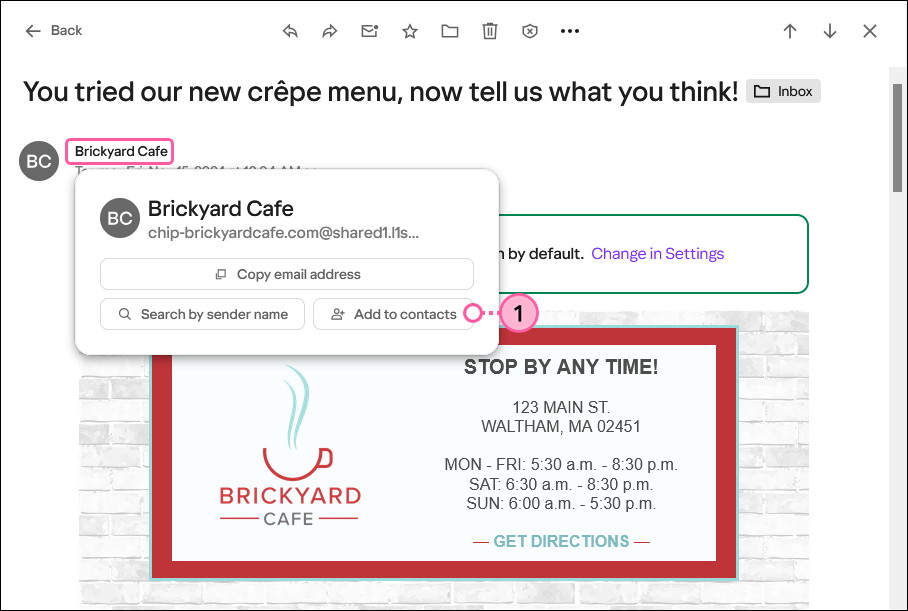
For additional help with safelisting email addresses and using message filters in Yahoo, please see Yahoo's support.
Certain firewall and intrusion prevention security programs can interfere (or block) email from Constant Contact. If your contacts aren't receiving your emails and you already had them safelist your "From Email" address in their email client, they sometimes also have to update the safelist in their security program as well. This is less likely to affect web-based email programs, like Gmail, Yahoo, or AOL, and more likely to affect desktop-based email programs, like Outlook, Thunderbird, or AppleMail, because they sit behind the firewall for an operating system or network.
If you don't see your contact's security program listed below, they'll have to visit support webpage for their security program and search for instructions to add "safe senders" to the safelist, or contact them directly.
 | Important: Some security programs prompt you to restart your computer to allow the changes to take effect. |
For additional help with safelisting email addresses in McAfee, please see McAfee's support.
AntiSpam works along with Outlook, Outlook Express, Netscape and Yahoo, MSN/Hotmail to block spam emails before they reach your inbox. To make sure emails reach you, you can add us to your Personal Friends list or Global Friends list. Here is how you can do that:
For additional help with safelisting email addresses in Norton, please see Norton's support.
For additional help with safelisting email addresses in SpamAssassin, please see SpamAssasin's support.
Any links we provide from non-Constant Contact sites or information about non-Constant Contact products or services are provided as a courtesy and should not be construed as an endorsement by Constant Contact.
Copyright © 2026 · All Rights Reserved · Constant Contact · Privacy Center